Introduction
Content strategy is the difference between random blog posts and SEO-driven traffic growth—and Webflow's CMS provides the perfect infrastructure for executing content strategies at scale.
Most websites publish content reactively: someone gets an idea, writes a post, publishes, hopes for traffic. No keyword research. No topic planning. No strategic intent. The result? Content that doesn't rank, doesn't drive traffic, and doesn't convert.
A strategic content approach changes everything: Every piece targets specific keywords, serves clear search intent, connects to broader topic authority, and moves prospects through the funnel. Content compounds over time, driving predictable organic growth month after month.
Webflow's CMS makes strategic content execution remarkably efficient. Dynamic collections organize content. Built-in SEO fields ensure optimization. Publishing workflows scale. Template-based design maintains quality. Marketing teams can execute sophisticated content strategies without developer dependencies. If you're still evaluating the platform itself, our honest breakdown of whether Webflow is good for SEO covers what it gets right and where the limitations are.
This guide walks through developing and implementing a complete SEO content strategy in Webflow—from keyword research and topic planning to CMS configuration, content creation, and performance optimization. Whether you're launching content marketing from scratch or reorganizing existing efforts, this framework transforms content from cost center to growth engine.
Why Content Strategy Matters in Webflow
Webflow isn't just a website builder—it's a content publishing platform optimized for SEO-driven growth.
CMS-Powered Content Advantages
Webflow's native CMS eliminates traditional content bottlenecks:
No developer dependency: Marketing teams create, publish, and optimize content independently. No tickets, no deployment cycles, no waiting for dev availability.
Template consistency: Design blog templates once, publish unlimited posts with perfect brand consistency. Every article inherits design standards automatically.
Dynamic filtering and categorization: Content automatically organizes by category, tag, author, or date. Taxonomy scales effortlessly.
Related content automation: Dynamic collection lists display related articles automatically based on shared categories or tags. Internal linking happens systematically, not manually.
Built-In SEO Tools
Webflow provides granular SEO control:
Field-level SEO settings: Every blog post gets dedicated meta title, meta description, and Open Graph image fields. Populate once, optimized forever.
Clean URL structure: Automatic slug generation with full customization control. SEO-friendly URLs by default.
Schema markup support: Add JSON-LD structured data to blog templates. Every post inherits Article schema automatically for rich SERP features.
Automatic sitemap generation: Webflow creates and maintains XML sitemaps including all blog posts. Google discovers new content immediately.
Fast loading speeds: Webflow's hosting and CDN ensure sub-2-second load times globally. Core Web Vitals optimized out of the box.
Publishing Velocity
Speed from idea to published content:
Traditional CMS (WordPress, custom): Idea → draft → design → development → staging → review → deployment = 1-2 weeks minimum
Webflow CMS: Idea → draft → publish = same day or next day
Strategic advantage: Rapid publishing enables timely content (news, trends, seasonal), faster testing and iteration, and competitive responsiveness.
Content Scalability
Webflow CMS handles growth:
Unlimited blog posts: No artificial limits on content volume (CMS limits apply to items per collection, not total posts)
Performance at scale: 500+ blog posts load fast, filter efficiently, and rank effectively
Management tools: Collection-based organization, bulk editing, and filtering make managing large content libraries practical
"Webflow transformed our content velocity. What took 10 days from draft to publish now happens in 24 hours. We publish 3× more content with the same team." — Content Marketing Director
Phase 1: Foundation & Research
Effective content strategy starts with understanding what to create before creating it.
Keyword Research for Webflow Sites
Identify content opportunities systematically:
Tools: Ahrefs, SEMrush, Google Keyword Planner, Answer the Public—for a curated breakdown of which tools work best for Webflow sites specifically, see our guide to the best Webflow SEO tools for keyword research and auditing.
Keyword research process:
- Seed keywords: Start with 5-10 core topics relevant to your business
- Example: Project management SaaS → "project management," "team collaboration," "task tracking"
- Expand keyword universe: Use tools to discover variations, long-tail keywords, question-based queries
- Find 100-500 keyword opportunities per seed topic
- Analyze metrics: Search volume, keyword difficulty, search intent, business value
- Prioritize keywords with 500+ monthly searches, difficulty <30 for early wins
- Organize by search intent:
- Informational: "What is project management" (top-funnel)
- Navigational: "Best project management tools" (mid-funnel)
- Transactional: "Project management software for startups" (bottom-funnel)
Target: 50-100 prioritized keywords across funnel stages
Competitor Content Analysis
Learn from what's already working:
Identify top competitors: Who ranks for your target keywords?
Content audit process:
- What topics do they cover comprehensively?
- What content gaps exist (topics they missed)?
- What content formats perform best (guides, listicles, how-tos)?
- How deep is their content (word count, comprehensiveness)?
- What's their internal linking strategy?
Tools: Ahrefs Content Gap, SEMrush Topic Research—and the best site audit tools for Webflow sites can help you crawl your own content library to identify gaps and thin pages before planning new production.
Insights: Understand the content bar for ranking, identify differentiation opportunities, avoid reinventing wheels
Topic Cluster Identification
Organize content around strategic pillars:
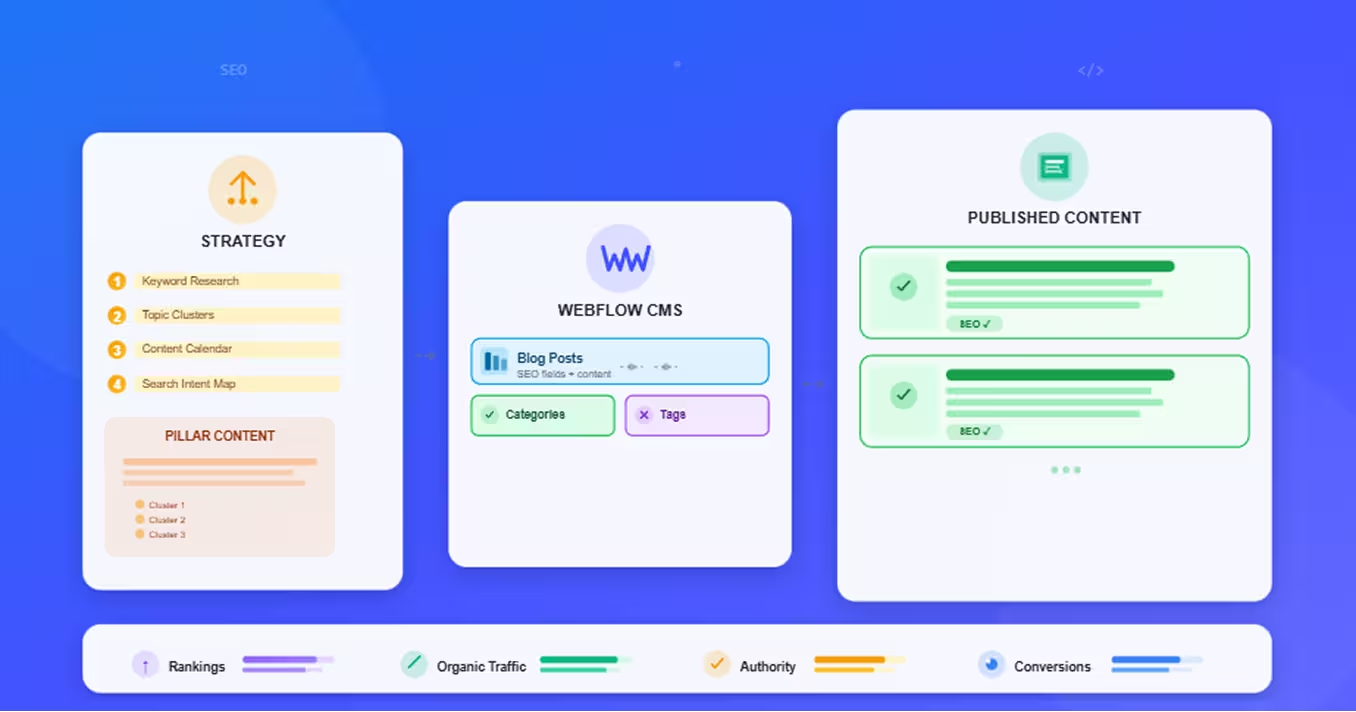
Topic cluster model:
- Pillar content: Comprehensive guide on broad topic (e.g., "Complete Guide to Project Management")
- Cluster content: Specific subtopics linking to pillar (e.g., "Agile Project Management," "Remote Team Project Management")
Benefits: Topical authority signals to Google, internal linking structure built-in, user navigation improved
Example cluster:
- Pillar: "Email Marketing Strategy" (5,000 words)
- Clusters: "Email Subject Line Best Practices" (2,000 words), "Email Automation Workflows" (2,500 words), "Email Segmentation Strategies" (2,000 words)
Target: 3-5 topic clusters for first 6 months
Search Intent Mapping
Match content to what users actually want:
Four search intent types:
Informational intent: User wants to learn
- Query: "What is SEO"
- Content format: Comprehensive guide, tutorial, explanation
Navigational intent: User seeks specific website/brand
- Query: "Webflow login"
- Content format: Landing page, product page
Transactional intent: User ready to take action (buy, signup)
- Query: "Best project management software"
- Content format: Comparison, product page, pricing
Commercial investigation: User researching before decision
- Query: "Webflow vs WordPress"
- Content format: Detailed comparison, pros/cons analysis
Mapping process: For each target keyword, identify search intent → create content matching that intent → optimize for conversion actions appropriate to intent
Phase 2: Content Planning & Architecture
Strategic planning transforms keyword lists into executable content roadmaps.
Pillar Content Strategy
Pillar pages are foundation of topical authority:
Pillar characteristics:
- Comprehensive coverage of broad topic (3,000-7,000 words)
- Multiple sections addressing subtopics
- Internal links to cluster content
- High-value, evergreen content
Pillar identification:
- What are your core expertise areas?
- What topics drive most business value?
- What have you been asked about repeatedly?
Typical pillar count: 3-5 pillars for focused strategy, 10-15 for comprehensive approach
Example pillar topics:
- B2B SaaS: "Complete Guide to [Your Product Category]"
- Agency: "Comprehensive [Service] Guide"
- E-commerce: "Ultimate [Product Category] Buying Guide"
Topic Clusters in Webflow CMS
Structure content relationships in Webflow:
CMS setup for topic clusters:
- Blog Posts collection: Main content collection
- Categories collection: Pillar topics (one category = one cluster)
- Tags collection: Subtopics and additional taxonomy
Relationships:
- Each blog post references one Category (its cluster)
- Posts within same category automatically connect
- Pillar page lists all cluster posts dynamically
Template implementation:
- Category template page becomes pillar content page
- Displays category description + lists all posts in category
- Creates hub-and-spoke internal linking automatically
Content Calendar Creation
Plan content production systematically:
Quarterly planning framework:
Q1 Goals: Launch Pillar 1 + 10 cluster articles
- Weeks 1-2: Pillar content creation and optimization
- Weeks 3-12: 1 cluster article per week
Content calendar elements:
- Target keyword and search intent
- Content type (pillar, cluster, comparison, how-to)
- Word count target
- Author assignment
- Publish date
- Status (ideation, outline, draft, editing, scheduled, published)
Production rhythm:
- Week 1: Research and outline
- Week 2: First draft
- Week 3: Editing and optimization
- Week 4: Publishing and promotion
A content calendar works best as part of a broader plan—if you haven't yet mapped out your full SEO timeline and priorities, our guide on how to create an SEO roadmap for your website walks through the complete phased framework.
Tools: Notion, Airtable, Google Sheets, Asana
Resource Allocation
Plan team capacity and workflows:
Typical content production needs:
3,000-word pillar article: 12-20 hours
- Research and outlining: 4-6 hours
- Writing: 6-10 hours
- Editing and optimization: 2-4 hours
2,000-word cluster article: 8-12 hours
- Research and outlining: 2-3 hours
- Writing: 4-6 hours
- Editing and optimization: 2-3 hours
Team structure options:
Small team (1-2 people):
- 1-2 articles per week
- 4-8 articles per month
- Focus on quality over quantity
Medium team (3-5 people):
- 3-5 articles per week
- 12-20 articles per month
- Mix of pillars and clusters
Outsourcing strategy:
- In-house: Strategy, outlines, editing, optimization
- Freelance: First drafts based on detailed briefs
- Maintains quality while scaling production
Phase 3: Webflow CMS Setup for Content
Configure Webflow CMS for efficient content management and SEO.
Blog Collection Structure
Essential fields for blog posts:
Content fields:
- Name (Text): Article title
- Slug (Slug): URL-friendly version, auto-generated
- Post Body (Rich Text): Main article content
- Excerpt (Plain Text): Short summary for listings
- Featured Image (Image): Hero image for post and Open Graph
Taxonomy fields:
- Category (Reference): Links to Categories collection (topic cluster)
- Tags (Multi-Reference): Links to Tags collection (additional topics)
- Author (Reference): Links to Authors collection
SEO fields:
- Meta Title (Text): Custom title tag (60 characters)
- Meta Description (Plain Text): Custom meta description (160 characters)
- OG Image (Image): Social sharing image (1200×630px)
Metadata fields:
- Publish Date (Date): When published
- Last Updated (Date): Most recent update
- Featured Post (Switch): Highlight in featured sections
Category/Tag Taxonomy
Organize content strategically:
Categories collection (topic clusters):
- Name: Pillar topic name
- Slug: URL for category page
- Description: Pillar content overview
- Image: Visual for category
Usage: Each post belongs to ONE category (its primary topic cluster)
Tags collection (supplemental taxonomy):
- Name: Tag name
- Slug: URL for tag archive
Usage: Posts can have MULTIPLE tags for cross-referencing
Example structure:
- Category: "Content Marketing" (pillar topic)
- Tags: "SEO," "Blog Writing," "Content Strategy" (related subtopics)
SEO Field Configuration
Optimize at scale:
Dynamic SEO patterns:
Meta Title formula: "[Post Name] | [Company Name]"
- Auto-populates from post title
- Consistent branding
Meta Description template: Populate manually per post with focus keyword and value proposition
Open Graph settings:
- OG Image: Featured Image or custom social image
- OG Title: Meta Title
- OG Description: Meta Description
Schema markup: Add Article schema to blog template—for a full walkthrough of schema, canonical tags, sitemaps, and every other technical layer, see our Webflow technical SEO guide.
json
{
  "@context": "https://schema.org",
  "@type": "Article",
  "headline": "Post Name",
  "author": {
    "@type": "Person",
    "name": "Author Name"
  },
  "datePublished": "Publish Date",
  "image": "Featured Image URL"
}
Author Management
Multi-author content strategy:
Authors collection:
- Name
- Bio (Rich Text)
- Photo (Image)
- Social Links (Text fields)
Benefits:
- E-E-A-T signals (expertise, authority)
- Author bylines on posts
- Author archive pages
- Team showcase
Phase 4: Content Creation & Optimization
Produce content that ranks and converts.
SEO-Optimized Content Writing
Writing process for search visibility:
Content brief creation:
- Target keyword
- Search intent analysis
- Competitive content review
- Outline with H2/H3 structure
- Key points to cover
- Target word count
On-page SEO elements:
Title optimization:
- Include target keyword naturally
- Front-load important words
- Create curiosity or value proposition
- Keep under 60 characters
Header hierarchy (H1 > H2 > H3):
- H1: Article title (one per page)
- H2: Main sections
- H3: Subsections
- Include variations of target keyword in headers
Content structure:
- Introduction (150-200 words): Hook, value proposition, what to expect
- Body (sections with H2/H3): Comprehensive coverage with examples, data, visuals
- Conclusion (100-150 words): Recap, next steps, CTA
- Keep paragraphs 2-4 sentences maximum for readability
Keyword optimization:
- Target keyword in title, first paragraph, headers, naturally throughout
- LSI keywords (semantically related terms)
- Avoid keyword stuffing—write naturally for humans
On-Page Optimization in Webflow
Technical SEO in Webflow Editor:
Rich Text field formatting:
- Use Webflow's Rich Text formatting for proper HTML tags
- Bold important terms (becomes
<strong>) - Create bulleted/numbered lists
- Add links with descriptive anchor text
Image optimization:
- Compress images before upload (TinyPNG, ImageOptim)
- Add descriptive alt text for all images
- Use descriptive filenames: "project-management-dashboard.jpg" not "IMG_1234.jpg"
- Implement lazy loading (Webflow handles automatically)—for a deeper dive into speed, image delivery, and Core Web Vitals, see our complete guide to Webflow performance optimization
Meta field population:
- Fill Meta Title field (unique per post, includes target keyword)
- Write compelling Meta Description (includes keyword, value prop, CTA)
- Upload OG Image (custom design or featured image)
Internal Linking Strategy
Build topical authority through links:
Link from pillar to clusters: Pillar page links to all cluster articles in topic
Link from clusters to pillar: Each cluster article links back to pillar page
Cross-link related clusters: Related articles within same topic link to each other
Implementation in Webflow:
- Manually add links in Rich Text content
- Use Collection List to display related posts automatically
- Create "Related Articles" section based on shared category/tags
Anchor text best practices:
- Descriptive (tells what linked page is about)
- Natural (reads well in sentence)
- Varied (not same anchor text repeatedly)
Content Types That Drive SEO
Comparison articles are particularly powerful for commercial intent traffic—our Webflow vs WordPress comparison is a strong example of how a well-structured comparison page can rank for high-intent queries and guide readers toward a decision.
Media Optimization
Visual content that enhances SEO:
Images:
- Hero image for every post (1200×800px recommended)
- Supporting images, screenshots, diagrams
- Custom graphics when helpful
- Compressed for performance
Videos:
- Embed YouTube/Vimeo videos
- Add video schema markup
- Include video transcript for accessibility
Infographics:
- Visual representation of data/processes
- Highly shareable
- Embed code option for backlinks
Phase 5: Publishing & Promotion
Make content work after it's published.
Publishing Workflows
Efficient content production:
Draft in Webflow CMS: Write directly in CMS Rich Text field or paste from Google Docs
Review process:
- Peer review for accuracy
- SEO checklist verification
- Final proofreading
Staging environment (Business plan+):
- Test how post looks before publishing
- Review on mobile/desktop
- Verify all links work
Publishing:
- Set publish date (immediate or scheduled)
- Click Publish
- Submit URL to Google Search Console for faster indexing
Content Distribution
Amplify reach beyond organic:
Social media promotion:
- Share on company channels (LinkedIn, Twitter, Facebook)
- Employee advocacy (team shares posts)
- Relevant groups and communities
Email marketing:
- Blog roundup newsletters
- Dedicated emails for pillar content
- Automated emails to new subscribers highlighting top content
Syndication (carefully):
- Medium, LinkedIn Articles (with canonical to original)
- Industry publications (with backlink to original)
Paid promotion (selective):
- Promote high-value content (pillar pages, lead magnets)
- Target lookalike audiences
- Drive initial engagement for ranking signal
Performance Tracking
Measure what matters:
Key metrics:
Traffic metrics (Google Analytics):
- Organic sessions per post
- Top-performing content by traffic
- Traffic trends over time
Engagement metrics:
- Time on page (longer = higher quality)
- Scroll depth
- Bounce rate (lower better for most content)
SEO metrics (Ahrefs, SEMrush, GSC):
- Keyword rankings
- Impressions and clicks in search
- Featured snippet wins
- Backlinks acquired
Conversion metrics:
- Newsletter signups from blog
- Demo requests from content
- Lead magnet downloads
Tools: Google Analytics 4, Google Search Console, Ahrefs/SEMrush—if you haven't connected GA4 to your Webflow site yet, our step-by-step guide on how to set up Google Analytics on Webflow properly covers the full process.
Iteration Based on Data
Continuous improvement:
Monthly content review:
- Identify top 10 performing posts (double down on what works)
- Identify underperforming posts (opportunities for optimization)
- Analyze keyword ranking movements
- Spot content gaps based on search queries
Content refresh strategy:
- Update top-performing content quarterly (keep current, expand)
- Optimize underperformers (improve title, add depth, better targeting)
- Consolidate thin content (merge similar posts)
- Prune outdated content (delete or redirect)
A/B testing opportunities:
- Title variations (CTR optimization)—Webflow A/B testing tools and methods let you run proper experiments on CTAs, layouts, and copy without needing external platforms
- Meta description testing
- CTA placement and copy
- Content structure experiments
Conclusion
SEO content strategy in Webflow combines strategic planning with efficient execution—from keyword research and topic clustering to CMS configuration and performance optimization.
The framework:
- Phase 1: Research keywords, analyze competitors, map search intent
- Phase 2: Plan topic clusters, create content calendar, allocate resources
- Phase 3: Configure Webflow CMS with proper collections and SEO fields
- Phase 4: Create and optimize content systematically
- Phase 5: Publish, promote, track performance, iterate
Webflow's advantages: No developer dependency, template consistency, built-in SEO tools, publishing velocity, and content scalability make it ideal for content-driven SEO strategies.
Getting started:
- Conduct keyword research (50-100 target keywords)
- Identify 3-5 topic clusters
- Set up Webflow blog collection with SEO fields
- Create pillar content template
- Publish first pillar page + 5 cluster articles
- Monitor performance and optimize
The compounding effect: Each strategic article builds on previous content, internal linking strengthens topical authority, search visibility increases month over month. Content strategy isn't a cost—it's an investment that compounds.
Start with one topic cluster, prove the model, scale what works.
Frequently Asked Questions
How many blog posts should I publish per month for SEO results?
Quality beats quantity, but consistency matters.
Minimum viable frequency: 4-8 posts per month (1-2 per week)
- Establishes publishing rhythm
- Builds momentum with search engines
- Demonstrates active site to Google
Optimal frequency for growth: 12-20 posts per month (3-5 per week)
- Faster topic authority building
- More keyword targeting opportunities
- Quicker SEO results
Maximum sustainable frequency: Depends on quality maintenance
- Never sacrifice quality for quantity
- One great 3,000-word article > five mediocre 500-word posts
Strategic approach:
Months 1-3: 4-8 posts/month focusing on pillar content and key clustersMonths 4-6: Scale to 12-16 posts/month as team finds rhythmMonths 7-12: Maintain 12-20 posts/month with mix of new and updated content
Reality check:
- Small team (1-2 people): 4-8 quality posts/month sustainable
- Medium team (3-5): 12-20 posts/month achievable
- Outsourcing: Can scale further while maintaining quality with good briefs—before expanding production, it's worth understanding how SEO and AI-generated content interact, so you can use AI tools to accelerate without risking rankings
Timeline to results:
- Months 1-3: Minimal traffic (content indexing, establishing authority)
- Months 4-6: Traffic acceleration (rankings improving, cumulative effect)
- Months 7-12: Significant growth (compounding returns, established authority)
Recommendation: Start with 4-8 quality posts monthly, prove ROI, then scale.
Should I write long-form or short-form content for SEO?
Length should match search intent and competition—not arbitrary targets.
Search intent determines ideal length:
Informational queries → Longer content (2,000-5,000 words)
- Example: "Complete guide to email marketing"
- Users want comprehensive coverage
- Competitors likely have deep content
- More depth = better ranking potential
Quick answer queries → Shorter content (500-1,000 words)
- Example: "How to reset Webflow password"
- Users want fast answer, not essay
- Concise response satisfies intent
- Over-writing wastes time
Commercial/comparison queries → Medium-to-long (1,500-3,000 words)
- Example: "Webflow vs WordPress"
- Need sufficient detail for decision-making
- Balance depth with scannability
Competitive analysis matters:
- Google top 10 results for target keyword
- What's average word count? (Ahrefs/SEMrush show this)
- Match or exceed to compete
Word count guidelines by content type:
Pillar content: 3,000-7,000 words
- Comprehensive topic coverage
- Multiple sections and subtopics
- Internal hub for topic cluster
Cluster articles: 1,500-2,500 words
- Focused subtopic deep dive
- Substantial but not exhaustive
- Links to/from pillar
How-to guides: 1,000-2,000 words
- Step-by-step instructions
- As long as needed to be complete
- Visual aids reduce word count need
Listicles: 1,000-2,000 words
- 100-200 words per list item
- Depth appropriate to topic
News/updates: 500-800 words
- Timely information
- Concise delivery
Quality > length:
- 1,500 well-researched, well-structured words > 3,000 words of fluff
- Cut ruthlessly—every word should add value
- Readers skim—make content scannable
Bottom line: Write as long as needed to fully answer query and match/beat competition. No more, no less.
How do I optimize existing Webflow blog content for better rankings?
Content refresh drives rankings faster than new content creation.
Content audit process:
Step 1: Identify optimization opportunities
Use Google Search Console to find:
- Posts ranking positions 6-20 (close to top 5, winnable with optimization)
- Posts with high impressions, low clicks (CTR opportunity)
- Posts with declining traffic (needs refresh)
Use Google Analytics to find:
- High bounce rate posts (improve content quality)
- Low time-on-page posts (add depth, improve engagement)
- Top traffic posts (maximize their potential)
Step 2: Prioritize posts
Impact vs. effort matrix:
- High impact, low effort: Posts ranking 6-15 for valuable keywords
- High impact, high effort: Pillar content needing major update
- Low effort: Quick wins (improve title, add section, optimize meta)
Step 3: Optimization checklist
Content improvements:
- Expand depth: Add 500-1,000 words of valuable content
- Update information: Replace outdated stats, examples, screenshots
- Add sections: Cover subtopics competitors address that you missed
- Improve structure: Better H2/H3 hierarchy, shorter paragraphs
- Add media: Images, videos, infographics for engagement
- Internal links: Link to newer related content
Technical SEO updates:
- Title tag: Include target keyword, improve CTR appeal
- Meta description: Rewrite for better click-through rate
- URL optimization: If URL is poor, 301 redirect to better one (careful—only if significant improvement)
- Image alt text: Add missing alt text, optimize existing
- Schema markup: Ensure Article schema present
On-page SEO:
- Keyword optimization: Ensure target keyword in title, intro, headers
- LSI keywords: Add semantically related terms naturally
- Featured snippet: Format content to target snippet (lists, tables, definitions)
User experience:
- Mobile check: Verify mobile readability
- Load speed: Compress images, optimize embeds
- CTAs: Add or improve calls-to-action
Step 4: Republish with new date
- Update "Last Updated" field in Webflow
- Optionally change publish date to current date (signals freshness)
- Submit updated URL to Google Search Console
Step 5: Promote updated content
- Reshare on social media
- Email to subscribers
- Link from new related content
Expected timeline:
- Week 1-2: Google re-crawls and re-indexes
- Week 3-4: Rankings begin improving
- Month 2-3: Full impact visible
Maintenance schedule:
- Top 10 posts: Review quarterly, update as needed
- Pillar content: Refresh every 6 months
- Evergreen posts: Annual review and update
- News/timely content: Update when topic evolves
Resource allocation: Content refresh often delivers 2-3× ROI vs. new content (less work, faster results).
What's the best way to structure internal linking in Webflow CMS?
Strategic internal linking builds topical authority and distributes page authority.
Hub-and-spoke model (topic clusters):
Pillar page (hub): Comprehensive guide on broad topic
- Links out to all cluster articles
- Receives links from all clusters
Cluster articles (spokes): Focused subtopic content
- Link back to pillar page
- Cross-link to related cluster articles
Webflow implementation:
Method 1: Manual contextual links
In Rich Text content:
- Link from pillar to clusters when mentioning subtopics
- Link from clusters to pillar when referencing broader topic
- Add 3-5 contextual links per article to related content
Anchor text: Descriptive phrase (e.g., "learn more about email segmentation strategies") not generic ("click here")
Method 2: Dynamic Collection Lists
Related posts section (automatic):
- Add Collection List element to blog template
- Filter: Posts with same Category (automatically shows cluster articles)
- Display: 3-5 related posts with image, title, excerpt
- Updates automatically as content grows
Category page as pillar:
- Category template displays all posts in category
- Becomes natural pillar page listing all cluster content
- Add category description as pillar content at top
Method 3: Sidebar navigation
Dynamic category navigation:
- Display all categories in sidebar
- Shows content structure
- Easy topic browsing
Internal linking best practices:
Link depth: Every page should be 3 clicks or fewer from homepage
Anchor text variety:
- Use target keywords naturally
- Vary anchor text (not same phrase repeatedly)
- Avoid over-optimization (100% exact match anchors looks spammy)
Link relevance: Only link related content (helps users AND Google)
Link quantity per post:
- 3-5 contextual links in content
- 3-5 related posts section at bottom
- Breadcrumb navigation
- Author bio with link to author page
Update old content: When publishing new content, go back and link from older related posts
Avoid:
- Linking every keyword occurrence (overlinking)
- Circular linking (Page A → Page B → Page A only)
- Generic "click here" anchors
- Irrelevant links just for SEO
Monitoring:
- Use Screaming Frog or Ahrefs to audit internal links
- Identify orphaned pages (no internal links)
- Find broken internal links
- Analyze anchor text distribution
Maintenance: Quarterly internal link audit to ensure structure stays coherent as content library grows.