Key Takeaways
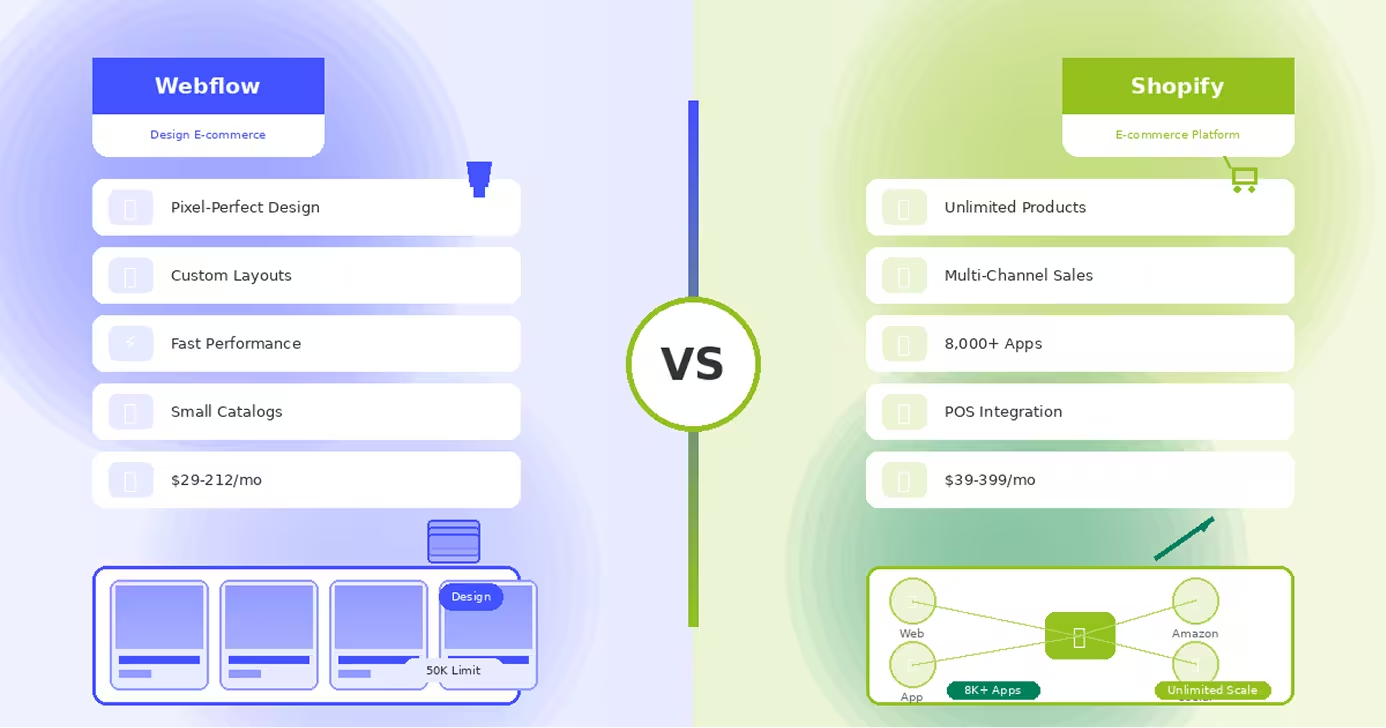
- Webflow prioritizes design flexibility with pixel-perfect control, while Shopify focuses on comprehensive e-commerce functionality
- Shopify supports unlimited products and scales infinitely, while Webflow caps at 50,000 total items limiting growth
- Shopify offers 8,000+ apps for any e-commerce feature, while Webflow has minimal native integrations
- Webflow costs less for entry-level stores ($29-74/month), while Shopify starts at $39/month with better features
- Shopify enables multi-channel selling across Amazon, social media, and marketplaces that Webflow cannot match
- Webflow delivers superior design control creating unique brand experiences impossible with Shopify templates
- Shopify includes POS for retail stores, while Webflow is strictly online-only e-commerce
- Choose Webflow for design-focused boutique brands with smaller catalogs prioritizing visual uniqueness
- Choose Shopify for serious e-commerce businesses requiring robust features, apps, and unlimited scalability
- Migration difficulty: Moving from Webflow to Shopify later requires complete store redesign and rebuild
Introduction
Choosing between Webflow and Shopify represents a critical decision about your e-commerce strategy: do you prioritize stunning design flexibility or comprehensive e-commerce functionality? Understanding this trade-off is essential before investing in your online store.
Webflow is a visual design platform that recently added e-commerce capabilities. It excels at creating beautiful, custom-designed online stores with pixel-perfect control over every visual element. For brands where design is paramount, Webflow delivers unmatched creative freedom.
Shopify, conversely, is the world's leading e-commerce platform powering over 4 million stores globally. It's built specifically for online selling with extensive features for inventory management, multi-channel sales, advanced shipping, and unlimited scalability.
Both enable selling products online, but their philosophies differ fundamentally. This comprehensive comparison examines design capabilities, e-commerce features, app ecosystems, payment processing, scalability, and pricing to help you choose the right foundation for your online business. Whether you're launching a boutique brand or scaling a major retail operation, understanding these platforms' strengths ensures sustainable growth.
Webflow: Design-First E-commerce
Webflow approaches e-commerce from a designer's perspective, offering unparalleled visual control over your online store's appearance while providing essential selling functionality.
What Webflow E-commerce Offers
Pixel-Perfect Store Design: Webflow provides complete design freedom over your store's appearance. Unlike template-based platforms, you control every aspect—product layouts, checkout experience, cart design, and responsive behavior across devices.
Visual CMS Integration: Create custom product templates with any layout imaginable. Design how products appear on category pages, individual product pages, and search results with full creative control.
Clean, Fast Performance: Webflow generates production-ready code that loads quickly and scores excellently on Core Web Vitals. Your store performs like a hand-coded site without the development cost.
Built-in Hosting: Global CDN hosting included with automatic SSL, image optimization, and fast delivery worldwide. No separate hosting setup or technical maintenance required.
Flexible Product Options: Support for physical and digital products, variant options (size, color, etc.), and customizable shopping experiences. Basic e-commerce needs are well-covered.
Ideal Use Cases
- Design-focused brands where visual presentation is crucial
- Small to medium catalogs (up to a few hundred products)
- Boutique stores emphasizing brand experience
- Digital product sales (courses, templates, downloads)
- Brands wanting unique, custom store designs
- Projects where design quality matters more than advanced features
Limitations
Webflow e-commerce has significant functional limitations: no built-in multi-channel selling (Amazon, eBay, social media), limited inventory management, basic shipping calculations, no point-of-sale integration, minimal abandoned cart recovery, and a 50,000 item limit across all products and variants. Advanced e-commerce needs quickly outgrow Webflow's capabilities.
Shopify: E-commerce Specialist
Shopify is a comprehensive e-commerce platform built exclusively for online selling, providing everything needed to launch, manage, and scale a successful online store.
What Shopify Delivers
Complete E-commerce Feature Set: Shopify offers unlimited products, advanced inventory management, multi-location inventory tracking, sophisticated shipping rules, abandoned cart recovery, discount codes, gift cards, and comprehensive order management.
Multi-Channel Selling: Sell across multiple channels from one dashboard—your Shopify store, Amazon, eBay, Facebook, Instagram, Pinterest, and more. Inventory syncs automatically across all channels.
Massive App Ecosystem: Access to 8,000+ apps for any functionality imaginable—email marketing, loyalty programs, advanced shipping, product reviews, subscriptions, and specialized features. Extend Shopify infinitely.
Payment Flexibility: Shopify Payments (no transaction fees) plus support for 100+ payment gateways worldwide. Accept all major credit cards, digital wallets, and local payment methods.
Point of Sale: Integrated POS system for retail stores, pop-ups, and markets. Sync online and offline inventory, accept in-person payments, and manage omnichannel retail seamlessly.
Scalability: Powers everything from startup stores to enterprise retailers. Shopify scales effortlessly as your business grows—handling millions in revenue and high-traffic sales events.
Perfect Scenarios
- Serious e-commerce businesses with growth ambitions
- Large product catalogs (hundreds to thousands of products)
- Multi-channel sellers using Amazon, social media, and marketplaces
- Retail stores needing integrated online/offline sales
- Subscription products and recurring revenue models
- Businesses requiring advanced features and apps
- Brands prioritizing sales functionality over design uniqueness
Constraints
Shopify's design customization is more limited than Webflow. While themes are attractive, achieving truly unique, pixel-perfect designs requires Shopify developers and custom Liquid coding. Design flexibility is the trade-off for comprehensive e-commerce functionality.
Head-to-Head Comparison
Let's examine how Webflow and Shopify compare across critical dimensions:
Design Flexibility and Control
Webflow: Offers unmatched design freedom with pixel-perfect control over every element. Create completely custom store designs matching your exact vision without code limitations or template constraints.
Shopify: Provides template-based design with hundreds of professional themes. Customization is possible but limited—achieving unique designs requires developers skilled in Liquid (Shopify's template language).
Winner: Webflow dramatically outperforms Shopify in design flexibility and visual customization.
E-commerce Features and Functionality
Webflow: Covers basic e-commerce needs—product variants, cart, checkout, order management. Limited to 50,000 total items (including variants), basic inventory tracking, simple shipping calculations, and minimal abandoned cart features.
Shopify: Delivers comprehensive e-commerce functionality—unlimited products, advanced inventory management across multiple locations, sophisticated shipping rules, abandoned cart recovery, discount codes, gift cards, multi-currency, and extensive order management.
Winner: Shopify dominates e-commerce features; Webflow covers basics but lacks advanced capabilities.
Apps and Integrations
Webflow: Limited native integrations plus ability to embed third-party tools. The app ecosystem is minimal—extending functionality requires custom code or external services.
Shopify: Massive 8,000+ app marketplace covering every e-commerce need—email marketing, loyalty programs, reviews, subscriptions, advanced shipping, accounting integrations, and specialized functionality.
Winner: Shopify's app ecosystem is unmatched; Webflow can't compete in extensibility.
Payment Processing and Fees
Webflow:
- Uses Stripe for payments (2.9% + 30¢ per transaction)
- No additional transaction fees
- Limited payment gateway options
Shopify:
- Shopify Payments: 2.4-2.9% + 30¢ (no transaction fees)
- 100+ payment gateways supported globally
- Transaction fees (0.5-2%) if not using Shopify Payments
- More flexible payment options worldwide
Winner: Shopify offers better payment flexibility and rates at higher tiers.
Scalability and Growth
Webflow: Suitable for small to medium stores with straightforward needs. The 50,000 item limit and basic features constrain growth. Migrating off Webflow as you scale can be painful.
Shopify: Built for unlimited scalability. Powers small startups to billion-dollar enterprises. Handles massive traffic spikes, flash sales, and international expansion without platform constraints.
Winner: Shopify scales infinitely; Webflow has clear growth limitations.
Ease of Use
Webflow: Moderate learning curve requiring understanding of design concepts. Building a store is more complex than template platforms but offers greater creative control.
Shopify: Extremely beginner-friendly with intuitive setup, guided onboarding, and straightforward store management. Launch selling quickly without technical knowledge.
Winner: Shopify is significantly easier for non-designers to launch stores quickly.
Pricing Structure
Webflow E-commerce:
- Standard: $29/month (500 items, 2% transaction fee)
- Plus: $74/month (1,000 items, 0% transaction fee)
- Advanced: $212/month (3,000 items, 0% transaction fee)
Shopify:
- Basic: $39/month (unlimited products)
- Shopify: $105/month (better rates, more features)
- Advanced: $399/month (advanced reporting, best rates)
- Plus: $2,000/month (enterprise features)
Winner: Webflow is cheaper at entry-level; Shopify offers better value for serious e-commerce.
When to Choose Webflow
Choose Webflow when you need to:
- Create visually stunning, unique store designs with complete creative control
- Build a boutique brand where design quality is paramount
- Sell small to medium product catalogs (under 500-1,000 items)
- Launch digital product stores (templates, courses, downloads)
- Combine e-commerce with content (blog, resources, marketing site)
- Prioritize design flexibility over advanced e-commerce features
- Maintain brand-forward presentation with custom experiences
- Keep platform costs lower for smaller operations
- Avoid the cookie-cutter appearance of template-based stores
Webflow excels when design quality and brand uniqueness matter more than extensive e-commerce functionality, and when your product catalog remains manageable.
When to Choose Shopify
Choose Shopify when you need to:
- Build a serious e-commerce business with growth ambitions
- Manage large product catalogs (hundreds to thousands of products)
- Sell across multiple channels (website, Amazon, social media, marketplaces)
- Operate retail stores requiring POS integration
- Offer subscriptions or recurring products
- Need advanced features (multi-location inventory, complex shipping, etc.)
- Scale internationally with multi-currency and language support
- Access thousands of apps for specialized functionality
- Focus on sales performance rather than unique design
- Require proven e-commerce reliability at any scale
Shopify is ideal when e-commerce functionality, scalability, and multi-channel selling are priorities, and design flexibility is acceptable trade-off.
Conclusion
Webflow and Shopify serve fundamentally different e-commerce needs. Webflow excels at creating beautiful, design-forward stores for brands prioritizing visual uniqueness with smaller catalogs. Shopify dominates comprehensive e-commerce functionality with unlimited scalability and multi-channel capabilities.
The choice is usually clear once you identify your priority: choose Webflow for design-focused boutique stores where brand presentation is everything. Choose Shopify for serious e-commerce operations requiring robust features and unlimited growth potential.
For growing businesses, Shopify typically becomes necessary as you scale—adding products, expanding to multiple channels, and requiring advanced features. Many brands start with design-focused platforms but migrate to Shopify as e-commerce becomes their core business.
The "better" platform depends on whether design uniqueness or e-commerce functionality matters more to your business model. Both excel at their core purposes—choose based on your primary goal.
FAQs
Q: Can I migrate from Webflow to Shopify later?
A: Yes, but migration requires rebuilding your store design in Shopify and transferring product data. Content (products, customers, orders) can export/import, but you'll lose Webflow's custom design and need to redesign in Shopify's system.
Q: Which platform is better for SEO?
A: Webflow typically delivers better technical SEO with faster loading times and cleaner code. However, Shopify offers more e-commerce-specific SEO features and apps. Both can rank well—Webflow has technical advantages, Shopify has e-commerce SEO tools.
Q: Does Webflow support dropshipping?
A: Webflow has limited dropshipping support requiring third-party integrations. Shopify excels at dropshipping with apps like Oberlo, Spocket, and DSers providing seamless supplier integration and automated order fulfillment.
Q: Which platform has lower total costs?
A: For small stores, Webflow can be cheaper ($29-74/month). For serious e-commerce, Shopify often costs less overall despite higher base pricing because it includes features that require expensive apps or custom development in Webflow.
Q: Can Shopify stores be as beautiful as Webflow stores?
A: Shopify stores can be beautiful using premium themes and custom development, but achieving Webflow-level design customization requires hiring Shopify developers. Webflow offers design flexibility out of the box; Shopify requires development investment for truly unique designs.