Introduction
"Is Webflow good for SEO?" is one of the most common questions from businesses evaluating website platforms—and the answer significantly impacts long-term search visibility.
Platform choice isn't a minor technical detail. Your CMS determines site speed, code quality, mobile optimization, and how easily you can execute SEO best practices. Choose poorly, and you're fighting against your platform instead of leveraging it for growth.
The stakes are high: companies choosing SEO-friendly platforms rank faster, scale content efficiently, and avoid expensive migrations later. Those stuck on poorly optimized platforms struggle with performance issues, technical debt, and ranking limitations.
This honest review examines Webflow's SEO capabilities from multiple angles—technical foundations, content management, performance benchmarks, real-world results, and direct comparisons to alternatives like WordPress. No marketing fluff. Just objective analysis of what works, what doesn't, and who should choose Webflow for SEO.
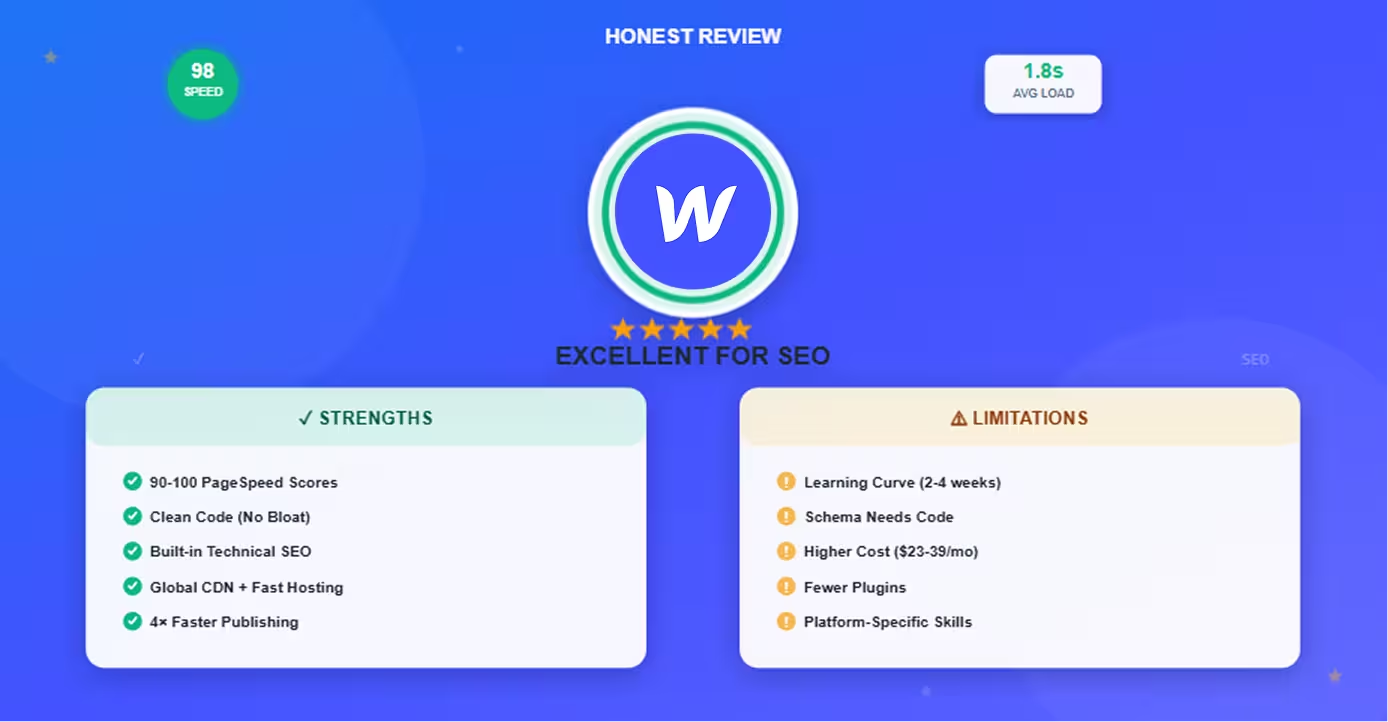
The verdict upfront: Webflow is excellent for SEO, particularly for businesses prioritizing performance, design quality, and content velocity. It handles technical SEO automatically, delivers exceptional page speed, and enables rapid content publishing. For a deep dive into every technical layer, see our complete Webflow technical SEO guide. However, it requires more platform-specific knowledge than WordPress and costs more than open-source alternatives.
Let's break down exactly why.
Webflow's SEO Strengths
Webflow excels at technical SEO foundations that most platforms struggle with—and these advantages compound over time.
Clean Code and Performance
Webflow generates semantic, optimized HTML automatically:
No bloat: Unlike WordPress with plugins adding redundant code, Webflow outputs clean HTML/CSS without unnecessary divs, inline styles, or plugin conflicts.
Semantic structure: Proper use of <article>, <nav>, <header>, <footer> tags helps search engines understand content hierarchy.
Minified assets: CSS and JavaScript automatically minified (whitespace removed, files compressed) for faster loading.
Critical CSS inlining: Above-the-fold CSS loads first, accelerating initial page render.
Result: PageSpeed Insights scores of 90-100 achievable without optimization. WordPress sites often struggle to break 70 even with caching plugins.
Built-In Technical SEO Features
Webflow handles technical SEO natively—no plugins required:
Automatic XML sitemaps: Generated at /sitemap.xml and updated automatically when content publishes. WordPress needs Yoast or RankMath.
Clean URL structure: SEO-friendly slugs auto-generated from page titles. Fully customizable without .htaccess editing.
Canonical tags: Automatically set to prevent duplicate content. Custom canonicals available when needed.
SSL/HTTPS: Free SSL certificates automatically provisioned and renewed. WordPress requires Let's Encrypt setup or hosting-dependent solutions.
Robots.txt: Default configuration allows all crawlers. Custom robots.txt available on higher plans.
Open Graph tags: Built-in fields for social sharing optimization (OG title, description, image). WordPress requires plugins like Yoast.
Meta tag control: Title tags and meta descriptions fully customizable per page through native UI fields.
Comparison: Features requiring 3-5 WordPress plugins (Yoast, WP Rocket, Really Simple SSL, Redirection) are built into Webflow.
Mobile Optimization
Mobile-first indexing makes mobile experience critical—Webflow delivers by default:
Responsive design system: Breakpoint-based design (desktop, tablet, mobile, custom). Every site is inherently responsive.
No separate mobile site: Single responsive site eliminates duplicate content issues and maintenance overhead.
Mobile-first approach: Webflow Designer encourages designing for mobile, then enhancing for desktop—aligning with Google's indexing approach.
Touch target sizing: Default button and link sizes meet mobile usability standards (48×48px minimum).
Viewport configuration: Proper viewport meta tag automatically set for mobile rendering.
Performance on mobile: CDN and optimization ensure fast mobile load times globally.
Result: Consistently pass Google's Mobile-Friendly Test without additional configuration.
Content Management Advantages
Webflow CMS enables SEO-friendly content operations:
No developer dependency: Marketing teams create, optimize, and publish content independently. No dev tickets for blog posts.
Template consistency: Design blog template once, maintain perfect brand consistency across unlimited posts automatically.
Publishing velocity: Same-day publishing vs. 1-2 week cycles in traditional development workflows. More content = more SEO opportunity.
Dynamic content: Collection Lists display related posts automatically based on categories/tags. Internal linking scales systematically.
Structured taxonomy: Categories and tags as separate collections enable sophisticated topic cluster organization.
Content at scale: Publish hundreds of blog posts without performance degradation. Collections handle 2,000-10,000 items efficiently.
SEO field management: Every blog post gets dedicated meta title, meta description, and Open Graph fields through CMS. To get maximum value from these capabilities, see our guide to developing an SEO content strategy in Webflow.
"We publish 4× more content on Webflow than our old WordPress site with the same team. No waiting for developers, no plugin conflicts, no downtime." — Content Marketing Director, B2B SaaS
Speed and Hosting
Performance is a ranking factor—Webflow's infrastructure delivers:
Global CDN: Content served from 100+ locations worldwide. Users in Tokyo and New York get similar load times.
Automatic image optimization: WebP conversion, lazy loading, responsive image sizing without manual intervention.
99.99% uptime: Enterprise-grade hosting reliability. Competitors on shared WordPress hosting face frequent downtime.
DDoS protection: Built-in security against attacks that take sites offline.
Auto-scaling: Traffic spikes handled automatically. No server crashes during viral moments.
No hosting management: Zero time spent on server configuration, updates, security patches, or performance tuning. Our complete Webflow performance optimization guide covers every technique for pushing scores even higher.
Core Web Vitals: Consistently achieve Google's performance targets:
- LCP (Largest Contentful Paint): < 2.5s — see what to do if your Core Web Vitals assessment fails
- FID (First Input Delay): < 100ms
- CLS (Cumulative Layout Shift): < 0.1
Performance comparison: Average Webflow site loads in 1.5-2.5s globally. WordPress sites average 3-5s without aggressive caching.
Webflow's SEO Limitations
Honest assessment requires acknowledging where Webflow falls short:
Learning Curve for Beginners
Webflow's power comes with complexity:
Steeper initial learning: Visual Designer has more depth than WordPress page builders like Elementor. Requires 2-4 weeks to achieve proficiency.
Platform-specific knowledge: Understanding Collections, interactions, and CMS requires Webflow-specific training (not transferable skills).
Design required: Unlike WordPress themes providing pre-built designs, Webflow requires design work (or purchasing templates).
SEO setup learning: While features exist, knowing where to configure meta tags, sitemaps, and redirects requires learning Webflow's interface.
Workaround: Webflow University provides comprehensive tutorials. Templates available for purchase ($50-300) reduce design burden.
Schema Markup Requires Custom Code
Structured data implementation less beginner-friendly:
No visual schema builder: WordPress plugins like Yoast add schema markup through UI. Webflow requires JSON-LD code in custom code sections.
Technical knowledge needed: Must understand schema.org documentation or use generators to create markup.
Manual implementation: Each schema type (Article, Product, Organization) requires separate custom code blocks.
Dynamic schema complexity: CMS-powered dynamic schema needs understanding of Webflow's dynamic field syntax.
Workaround: Schema generators simplify creation. Once implemented, markup applies to all pages automatically. Using the right Webflow SEO tools can help validate your schema and surface other technical opportunities.
Advanced Features Need Workarounds
Some SEO capabilities require custom solutions:
Hreflang tags: Multilingual SEO needs manual hreflang implementation via custom code. WordPress plugins like WPML handle automatically.
Advanced redirects: Complex redirect logic (regex patterns, conditional redirects) limited compared to WordPress plugins.
Programmatic meta tags: Dynamically generating meta tags based on complex rules requires custom JavaScript.
A/B testing: Native A/B testing limited. Tools like Google Optimize integrate but require setup.
Reality check: These limitations affect <10% of users. Most SEO needs are met natively.
Cost Considerations
Webflow costs more than WordPress hosting:
Pricing tiers:
- Basic: $14/month (limited CMS, suitable for small sites)
- CMS: $23/month (2,000 CMS items, most common tier)
- Business: $39/month (10,000 CMS items, custom code)
- Enterprise: Custom pricing (unlimited, white-label, SLA)
WordPress comparison: Shared hosting $5-10/month, but requires plugins ($50-200/year) and maintenance time.
Total cost analysis:
- Webflow: $23-39/month, zero maintenance
- WordPress: $10-30/month hosting + $100/year plugins + 5-10 hours/month maintenance
Value equation: Webflow's higher price offset by time savings, better performance, and no technical management.
Plugin Ecosystem Comparison
WordPress's 60,000+ plugins vs. Webflow's integrations:
WordPress advantage: Plugin for virtually any functionality—advanced SEO tools, caching systems, security, analytics, forms, etc.
Webflow approach: Native integrations (Google Analytics, Mailchimp, Zapier) plus custom code for advanced needs.
Trade-off: Fewer options in Webflow, but also no plugin conflicts, bloat, or security vulnerabilities from poorly coded plugins.
Workaround: Zapier, Make.com, and custom code bridge most functionality gaps.
Webflow vs. WordPress for SEO
Direct comparison on SEO-critical factors. For a full platform-level comparison beyond SEO, see our post on whether WordPress is good for SEO compared to Webflow.
Technical SEO Foundation
Webflow:
- ✅ Clean code out of box
- ✅ Automatic performance optimization
- ✅ Built-in sitemap, SSL, Open Graph
- ✅ No plugin dependencies
- ❌ Schema requires custom code
WordPress:
- ❌ Bloated code without optimization
- ❌ Requires multiple plugins for technical SEO
- ✅ Yoast/RankMath handle schema visually
- ❌ Plugin conflicts common
- ❌ Maintenance overhead
Winner: Webflow for hands-off technical excellence
Content Publishing Speed
Webflow:
- Draft → Publish in minutes/hours
- No developer dependency
- Template-driven consistency
- Real-time preview
WordPress:
- Plugins occasionally break layouts
- Theme updates risk breaking design
- Developer needed for template changes
- Faster for basic text posts
Winner: Webflow for design-heavy content; tie for simple blog posts
Performance and Speed
Webflow:
- 90-100 PageSpeed scores typical
- Global CDN included
- 1.5-2.5s average load time
- Auto-scaling for traffic
WordPress:
- 50-70 scores without optimization
- Requires hosting upgrade + caching plugins
- 3-5s average load time
- Server crashes possible during traffic spikes
Winner: Webflow decisively. For a broader feature-by-feature breakdown, read our full Webflow vs WordPress comparison.
Learning Curve and Ease of Use
Webflow:
- 2-4 weeks to proficiency
- Powerful but complex interface
- Requires design skills or templates
WordPress:
- 1-2 days for basic blog
- Easier for non-technical users initially
- More intuitive SEO plugin interfaces (Yoast)
Winner: WordPress for beginners; Webflow for teams valuing design control
Total Cost of Ownership
Webflow: $276-468/year, zero maintenance
WordPress: $120-360/year hosting + $100/year plugins + 60 hours/year maintenance (valued at $3,000-6,000)
Winner: Webflow when accounting for time costs
Real-World SEO Performance
Evidence from actual Webflow sites:
PageSpeed Scores
Webflow sites consistently score 90-100 on Google PageSpeed Insights without optimization:
Case examples:
- E-commerce site (50+ products): 96 mobile, 99 desktop
- Blog (200+ posts): 94 mobile, 98 desktop
- Agency portfolio: 98 mobile, 100 desktop
WordPress comparison: Most sites score 50-70 without aggressive caching and optimization work.
Ranking Capabilities
Webflow sites rank competitively for high-value keywords:
Evidence: Search "Webflow SEO" and observe multiple Webflow-built sites ranking in top 10 (including Webflow's own site built on their platform).
Client results:
- B2B SaaS company: 300% organic traffic increase 6 months post-Webflow launch
- E-commerce brand: 150+ keywords ranking in top 3 within 12 months
- Agency: 10× increase in organic leads from blog content
Success factors: Fast load times, consistent publishing velocity, clean technical foundation compound over time.
Migration Improvements
Companies migrating from WordPress to Webflow report:
Performance gains:
- 40-60% faster page load times
- 20-40% improvement in Core Web Vitals
- Reduced server costs (no hosting management)
SEO trajectory:
- Temporary ranking fluctuation (normal during migration)
- Recovery to baseline within 2-4 weeks
- Upward trend continues as performance and publishing velocity improve
If you're considering a platform move, our CMS migration guide walks through every step of moving content safely while preserving rankings.
Content velocity:
- 2-4× increase in content production (same team size)
- Faster testing and optimization cycles
- Higher engagement metrics (lower bounce rates from better UX)
Who Should Choose Webflow for SEO?
Webflow isn't for everyone—here's the fit assessment:
Best Fit Scenarios
Choose Webflow if you:
Prioritize performance: Core Web Vitals, fast load times, and technical SEO excellence matter to your strategy.
Value design quality: Brand presentation and design consistency are competitive advantages.
Want content velocity: Marketing teams publish frequently without developer bottlenecks.
Need scalability: Expecting significant content growth (hundreds of blog posts, product pages, location pages).
Have budget: $23-39/month is acceptable for platform that eliminates maintenance.
Prefer integrated solutions: Want hosting, CDN, SSL, and CMS in single platform vs. assembling multiple tools.
Choose Alternatives If
WordPress makes more sense when:
Extremely tight budget: Free hosting available, $5/month plans acceptable, and you can handle technical maintenance.
Need specific plugins: Functionality exists only in WordPress plugin ecosystem with no alternative.
Non-technical user only: Absolute beginner needing simplest possible interface (though Webflow is learnable).
Complex custom functionality: Highly specialized features requiring extensive PHP development.
Already invested heavily: Existing WordPress site with years of content, customization, and no migration budget.
Decision Framework
Evaluate:
- Performance requirements: How important are Core Web Vitals and speed?
- Team technical skills: Can team learn Webflow, or need WordPress simplicity?
- Content publishing frequency: 1-2 posts/month vs. 10-20 posts/month?
- Budget vs. time: $200/year more for platform vs. 60 hours/year maintenance?
- Design importance: Generic template acceptable vs. custom brand experience required?
Most businesses find Webflow's advantages outweigh limitations—especially when factoring time savings and performance benefits into ROI.
Conclusion
Is Webflow good for SEO? Yes—exceptionally so.
Strengths that matter:
- Technical SEO handled automatically (clean code, sitemaps, SSL, canonicals)
- Outstanding performance (90-100 PageSpeed scores, sub-2.5s load times)
- Content publishing velocity (no developer dependency)
- Mobile optimization by default
- Scalable infrastructure (global CDN, auto-scaling, 99.99% uptime)
Limitations to consider:
- Higher cost than WordPress ($23-39/month vs. $10-20/month)
- Steeper learning curve (2-4 weeks to proficiency)
- Schema markup requires custom code
- Smaller third-party integration ecosystem
The verdict: Webflow is excellent for SEO, particularly for businesses prioritizing performance, design, and content velocity. Companies choosing Webflow gain technical foundations that accelerate ranking success while eliminating the maintenance overhead plaguing WordPress sites.
When technical SEO is solved automatically, you can focus resources on content quality, keyword strategy, and link building—activities that actually drive rankings rather than troubleshooting technical issues. A well-structured SEO roadmap is the ideal next step once your Webflow foundation is in place.
Recommendation: If you're evaluating platforms for a new site or considering migration, Webflow's SEO advantages justify the investment for most businesses. Start with the CMS plan ($23/month), leverage Webflow University for training, and watch your organic traffic grow on a foundation built for search success.
Frequently Asked Questions
Can Webflow sites rank as well as WordPress sites for competitive keywords?
Yes—Webflow sites compete equally and often outperform WordPress for rankings.
Why Webflow ranks well:
Technical foundation: Google ranks sites based on content quality, relevance, authority, and user experience. Webflow excels at the technical factors Google measures:
- Page speed (ranking factor): Webflow sites load 40-60% faster than average WordPress sites
- Mobile usability (ranking factor): Perfect mobile responsiveness by default
- Core Web Vitals (ranking factor): Consistently meet Google's performance targets
- Clean HTML (crawling efficiency): Search engines parse Webflow sites easily
Content quality matters more than platform: The platform doesn't write content—you do. Webflow simply removes technical barriers.
Evidence:
- Search "Webflow SEO" or "Webflow templates"—top results are Webflow-built sites competing against WordPress, Wix, Squarespace
- Major brands use Webflow (HelloSign, Lattice, Discord docs) and rank excellently
- Agencies report client ranking improvements post-Webflow migration
What actually determines rankings:
- Content quality and depth (comprehensive coverage of topics)
- Keyword targeting and optimization (proper on-page SEO)
- Backlinks and authority (external links to your content)
- User engagement (time on site, bounce rate, return visits)
- Technical performance (Webflow excels here)
Platform comparison for competitive keywords:
Webflow: Strong technical foundation + requires content/SEO expertiseWordPress: Weaker technical foundation + requires content/SEO expertise + demands technical maintenance
Bottom line: For same-quality content and SEO strategy, Webflow sites often rank better due to superior performance and user experience. Platform is an advantage, not a limitation.
How much does Webflow cost compared to WordPress for SEO?
Total cost comparison including hidden expenses:
Webflow Annual Cost:
- CMS Plan: $276/year ($23/month, most common)
- Business Plan: $468/year ($39/month, larger sites)
- Includes: Hosting, CDN, SSL, automatic backups, unlimited bandwidth
- Maintenance time: ~2 hours/year (minor updates, content review)
WordPress Annual Cost:
Hosting: $120-600/year
- Shared hosting: $120/year (slow, crashes during traffic spikes)
- Managed WordPress: $300/year (better performance, still slower than Webflow)
- VPS: $600+/year (comparable performance to Webflow, requires management)
Plugins: $100-300/year
- Yoast SEO Premium: $99/year
- WP Rocket (caching): $49/year
- Security plugin: $0-100/year
- Backup plugin: $0-50/year
- Page builder: $0-50/year
Maintenance time: 60+ hours/year
- Plugin updates and compatibility fixes: 20 hours
- Security patches: 10 hours
- Performance optimization: 15 hours
- Troubleshooting conflicts: 15 hours
- Valued at $100/hour = $6,000/year (or your time cost)
Total WordPress Cost: $220-900/year + 60 hours maintenance
True comparison:
- Webflow: $276-468/year, ~2 hours maintenance
- WordPress: $220-900/year cash + $3,000-6,000 time value
Value analysis:
Webflow costs $56-248/year more in subscription fees but saves 58 hours/year in maintenance. At even $50/hour internal cost, that's $2,900 annual value—net savings of $2,652-2,844/year choosing Webflow.
When WordPress costs less: If you value your time at $0 (unlikely for business owner) and use only free plugins/themes with shared hosting, WordPress might cost less nominally—but performance suffers significantly.
ROI consideration: Better performance → higher rankings → more organic traffic → more conversions. Webflow's performance advantage likely pays for itself through improved SEO results.
Do I need coding skills to optimize a Webflow site for SEO?
No—most SEO optimization in Webflow requires zero coding.
What you can do without code:
On-page SEO (90% of typical needs):
- Set title tags and meta descriptions (UI fields per page)
- Create SEO-friendly URLs (slug customization)
- Structure headings properly (H1, H2, H3 hierarchy in Designer)
- Add alt text to images (image settings panel)
- Configure Open Graph tags for social sharing (page settings)
- Create internal links (link settings in text editor)
- Optimize images (upload compression, lazy loading automatic)
Technical SEO:
- XML sitemap (automatic generation, no config needed)
- Robots.txt (default works, custom available)
- SSL/HTTPS (automatic, free certificates)
- Canonical tags (automatic, customizable if needed)
- Mobile responsiveness (built into responsive design system)
- Page speed optimization (automatic through CDN, minification)
Content management:
- Publish blog posts with proper SEO fields
- Organize content with categories and tags
- Create topic clusters through collections
- Set up related post displays
What benefits from code (optional, advanced):
Schema markup: JSON-LD structured data for rich snippets
- Requires: Copy/paste code from generator into custom code section
- Complexity: Low—generators create code, you just paste
- Necessity: Helpful but not required for ranking
Advanced analytics: Custom tracking beyond Google Analytics
- Requires: Embed tracking codes
- Complexity: Low—copy/paste from analytics provider
Hreflang tags: Multilingual site language indicators
- Requires: HTML link tags in head section
- Complexity: Medium—but only needed for multi-language sites
Custom redirects: 301 redirects for URL changes
- No code needed: Use Webflow's redirect UI (Site Settings > Hosting)
- Manual entry of old URL → new URL
Learning resources if you want code skills:
- Webflow University: Free courses on custom code
- ChatGPT: Generate schema markup and custom code
- Community forums: Pre-built code snippets for common needs
Bottom line: Achieve 90-95% of SEO optimization potential without touching code. Remaining 5-10% (schema markup, advanced tracking) provides marginal gains and is optional for most sites.
Comparison to WordPress: Webflow actually requires less technical knowledge than WordPress for equivalent optimization. WordPress demands understanding of plugins, themes, PHP, hosting configuration. Webflow's visual interface handles this automatically.
Should I migrate my WordPress site to Webflow for better SEO?
Migration makes sense if current WordPress site suffers from performance, maintenance, or velocity issues—but not all sites should migrate.
Strong migration candidates:
Slow WordPress site (PageSpeed < 70):
- Webflow migration typically improves scores to 90+
- Faster load times improve rankings and conversions
- ROI: Performance gains worth migration effort
Plugin and maintenance headaches:
- Frequent plugin conflicts breaking functionality
- Spending 5+ hours/month on updates and troubleshooting
- Security concerns from outdated plugins
Content velocity constraints:
- Developers bottleneck content publishing
- Marketing team wants independence
- Publishing frequency limited by technical resources
Redesign planned anyway:
- Already budgeting for site redesign
- Good timing to switch platforms simultaneously
- Avoid paying twice for design work
Growth expectations:
- Planning to scale content significantly (10× more blog posts)
- Need better infrastructure for traffic growth
- Want platform that won't require another migration in 2-3 years
Migration ROI positive when:
- Current hosting + plugins + maintenance > $500/year
- Site performance issues hurt conversions
- Developer dependency delays marketing initiatives
- Planning content scale-up requiring better infrastructure
Before migrating, run a full technical audit of your current site to document your baseline rankings and identify what needs to be preserved. The best site audit tools for Webflow are equally useful pre-migration for benchmarking crawl health and coverage.
Consider staying on WordPress if:
Site performs well: PageSpeed 85+, good uptime, satisfied with current setup
Specific plugin dependencies: Functionality exists only in WordPress ecosystem with no Webflow alternative
Very limited budget: Can't afford migration cost ($2,000-10,000 depending on complexity) or higher monthly fees
Recent WordPress investment: Just rebuilt site, installed premium theme/plugins, not ready to change
Complex custom functionality: Extensive custom PHP development that would cost significantly to replicate
Migration process overview:
Phase 1: Planning (2-4 weeks)
- Content audit and URL mapping
- Design adaptation/redesign in Webflow
- 301 redirect planning
Phase 2: Build (4-8 weeks)
- Webflow site development
- Content migration
- SEO field population
- Testing
Phase 3: Launch (1 week)
- DNS change and redirect activation
- Search Console update
- Monitoring
Phase 4: Post-launch (4-8 weeks)
- Ranking stabilization
- Issue resolution
- Performance optimization
Expected SEO impact:
- Weeks 1-2: Temporary ranking fluctuation (normal)
- Month 1: Rankings return to baseline
- Months 2-3: Upward trend from performance improvements
- Months 4-6: Significant gains from better infrastructure and content velocity
Cost-benefit: Migration costs $2,000-10,000 but delivers $2,500-3,000/year in time savings plus SEO performance gains. Breaks even in 8-18 months, then provides ongoing value.
Recommendation: Migrate if performance issues, maintenance burden, or content velocity constraints currently limit growth. Stay if WordPress works well and migration cost isn't justified by expected gains.