Introduction
Choosing between Webflow and Wix is fundamentally about deciding whether you want simplicity or sophistication. These platforms represent opposite ends of the website builder spectrum, serving vastly different user needs and skill levels.
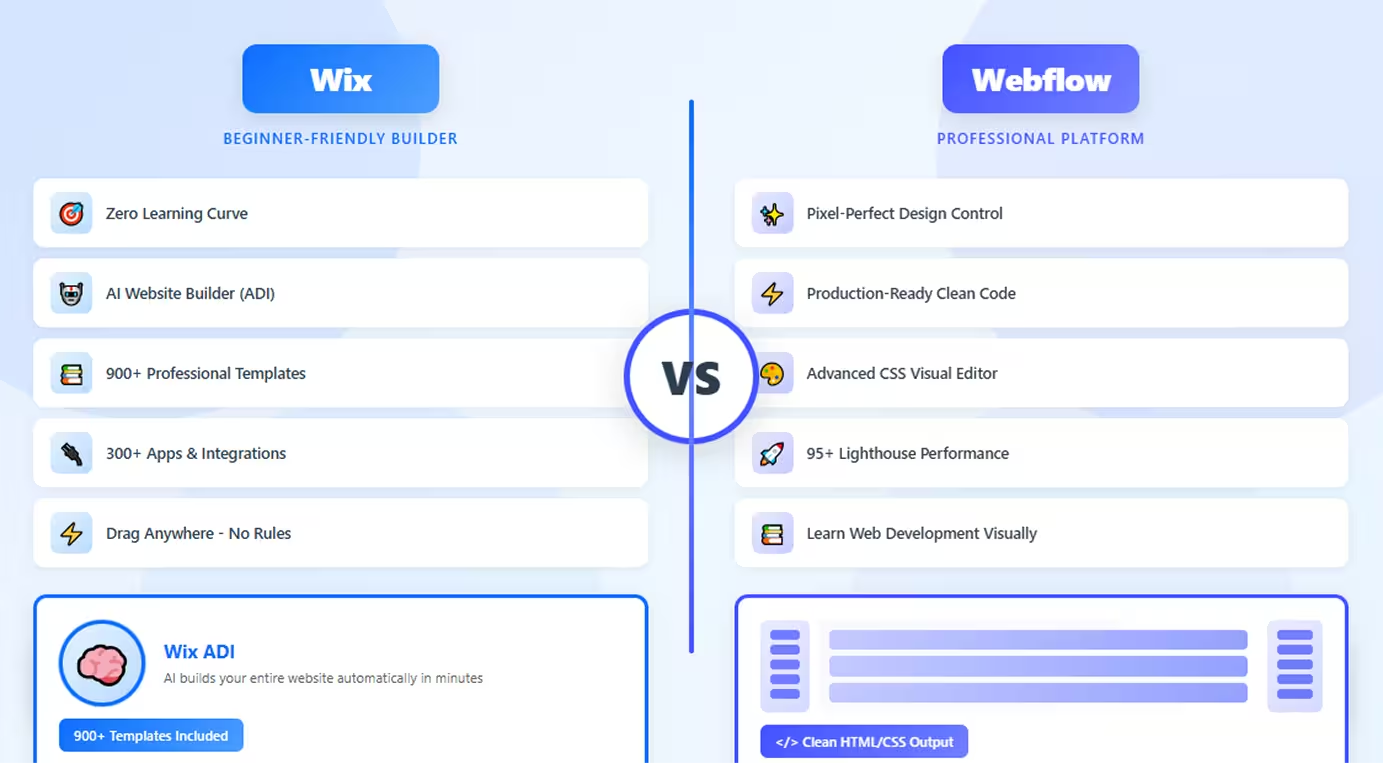
Wix is the world's most beginner-friendly website builder with over 200 million users globally. It's built for people with zero technical experience who want beautiful websites quickly. Wix's AI-powered design assistant and drag-and-drop simplicity make launching a website accessible to absolutely anyone.
Webflow, conversely, is a professional design platform that offers pixel-perfect control and production-quality code. It's the choice for designers, agencies, and businesses that need complete creative freedom without coding. Webflow has a steeper learning curve but delivers unmatched design capabilities.
Both create websites without code, but their target audiences and capabilities differ dramatically. This comprehensive comparison examines ease of use, design control, performance, e-commerce, integrations, and pricing to help you choose the right platform. Whether you're a small business owner, creative professional, or growing agency, understanding these differences ensures you invest in the right foundation for your web presence.
Wix: Beginner-Friendly Website Builder
Wix has perfected the art of making website creation accessible to everyone, regardless of technical skill. It's designed for speed, simplicity, and immediate results.
What Wix Offers
Drag-and-Drop Simplicity: Wix's visual editor is incredibly intuitive—literally drag elements anywhere on the page. No grid constraints, no technical concepts required. If you can use PowerPoint, you can use Wix.
ADI (Artificial Design Intelligence): Wix's AI website builder asks a few questions about your business and automatically generates a complete website with content, images, and structure. Customize from there or use as-is.
900+ Templates: Massive template library across every industry and niche—restaurants, photographers, online stores, portfolios, service businesses. Find professionally designed starting points for any project.
Comprehensive App Market: Access to 300+ apps for functionality like booking systems, live chat, email marketing, forms, social feeds, and specialized features. Extend capabilities easily.
All-in-One Platform: Wix includes hosting, domain registration, email marketing, analytics, and customer support—everything needed to run your website from one platform.
Wix ADI: The platform's standout feature creates complete websites automatically using AI, perfect for users who want results immediately without learning design.
Ideal Use Cases
- Complete beginners with no technical experience
- Small businesses needing simple websites quickly
- Personal websites and portfolios
- Event websites and one-page sites
- Projects with tight timelines requiring immediate launch
- Users wanting all-in-one simplicity without learning curves
Limitations
Wix offers limited design precision—you can't control exact spacing, margins, or responsive behavior with professional detail. Performance can be slower than optimized platforms. Once you choose a template, switching requires rebuilding your entire site. Code output is less clean than professional platforms.
Webflow: Professional Design Platform
Webflow is a visual development platform that transforms design into production-ready websites with complete creative control and clean code output.
What Webflow Delivers
Pixel-Perfect Design Control: Webflow provides unprecedented precision over every design element. Control typography, spacing, animations, and responsive behavior with designer-level detail—all visually without writing code.
Production-Grade Code: Unlike most builders, Webflow generates clean, semantic HTML and CSS that rivals hand-coded websites. The code is optimized, accessible, and follows web standards that developers respect.
CSS Visual Interface: The editor maps directly to CSS properties, teaching you web development concepts while designing. You're essentially writing CSS visually, gaining real technical skills.
Advanced Interactions: Create sophisticated animations including scroll-triggered effects, complex state changes, and timed sequences—all without JavaScript. Professional motion design capabilities built-in.
CMS Capabilities: Built-in content management system perfect for blogs, portfolios, and dynamic content. Create custom content types with complete design control over presentation.
Managed Hosting: Fast, global CDN hosting with automatic SSL, image optimization, and excellent Core Web Vitals scores. Professional-grade infrastructure included.
Perfect Scenarios
- Professional designers and agencies
- Marketing websites requiring performance and design quality
- Portfolio sites showcasing creative work
- Growing businesses needing scalable solutions
- Projects prioritizing design excellence and speed
- Teams wanting to learn web development visually
Constraints
Webflow has a significant learning curve requiring understanding of CSS concepts like flexbox, grid, and the box model. It's more expensive than beginner platforms. The learning investment pays dividends but isn't suitable for users wanting instant results without effort.
Head-to-Head Comparison
Let's examine how Wix and Webflow compare across critical dimensions:
Ease of Use and Learning Curve
Wix: Extremely beginner-friendly with intuitive drag-and-drop anywhere on the page. AI assistance creates complete sites automatically. Launch functional websites within hours with zero learning curve.
Webflow: Requires understanding web design concepts—box model, flexbox, positioning, and responsive design. The learning curve is substantial—expect weeks to months to become proficient.
Winner: Wix is dramatically easier for beginners; Webflow requires significant learning investment.
Design Flexibility and Control
Wix: Offers good design flexibility within template constraints. You can customize colors, fonts, layouts, and add elements, but achieving pixel-perfect precision or complex custom designs is challenging.
Webflow: Provides pixel-perfect, professional-level control over every design element. Create any layout possible with CSS, all through visual tools. Design freedom is exceptional.
Winner: Webflow offers professional design control; Wix provides good flexibility for simpler needs.
Templates and Customization
Wix: 900+ templates across all industries with beautiful starting points. However, switching templates after launch requires rebuilding your site. Template customization is somewhat limited.
Webflow: Fewer templates (around 100+) but fully customizable down to every pixel. Templates are starting points—you can completely transform them. No lock-in to template structure.
Winner: Wix for template quantity; Webflow for customization depth and flexibility.
Performance and Speed
Wix: Performance is adequate but not optimized. Sites can load slower due to Wix's infrastructure and how it generates code. Core Web Vitals scores are typically lower than optimized platforms.
Webflow: Delivers exceptional performance with fast loading times, automatic CDN delivery, image optimization, and clean code. Sites consistently score 90+ on Lighthouse and excel at Core Web Vitals.
Winner: Webflow significantly outperforms Wix in speed and technical SEO metrics.
E-commerce Capabilities
Wix: Solid e-commerce features including inventory management, multiple payment options, shipping calculations, and dropshipping integration. Good for small to medium online stores.
Webflow: Offers basic e-commerce suitable for smaller stores with straightforward needs. Limited to 15,000 SKUs and lacks some advanced features Wix provides for e-commerce.
Winner: Wix offers more comprehensive e-commerce features; Webflow is more limited for online stores.
Apps and Integrations
Wix: 300+ apps in the Wix App Market covering booking, marketing, analytics, social media, and specialized functionality. Easy one-click integration with most apps.
Webflow: Limited native integrations plus ability to embed third-party tools and custom code. Smaller ecosystem requires more technical work for integrations.
Winner: Wix has a larger, more accessible app ecosystem; Webflow requires more manual integration work.
Pricing Structure
Wix:
- Free: Wix branding and ads
- Combo: $16/month (basic site)
- Unlimited: $22/month (more bandwidth)
- VIP: $45/month (priority support)
- Business Basic: $27/month (e-commerce)
Webflow:
- Free: 2 unhosted projects
- Basic: $14/month per site
- CMS: $23/month per site
- Business: $39/month per site
- E-commerce: $29+/month per site
Winner: Both are similarly priced; Wix is slightly cheaper at entry levels; Webflow includes hosting.
When to Choose Wix
Choose Wix when you need to:
- Launch a website quickly without learning technical concepts
- Create a simple business website or personal site
- Work with zero technical experience or design knowledge
- Use AI to build your site automatically
- Need comprehensive e-commerce features for online stores
- Want all-in-one simplicity with apps, hosting, and tools integrated
- Build event websites, portfolios, or small business sites
- Avoid learning curves and get results immediately
- Require extensive app integrations without technical setup
- Prefer beginner-friendly editing and straightforward customization
Wix excels when immediate results, simplicity, and beginner-friendliness matter more than design precision or peak performance. It's perfect for non-technical users.
When to Choose Webflow
Choose Webflow when you need to:
- Create pixel-perfect, custom designs with professional quality
- Build high-performance websites with excellent Core Web Vitals
- Develop marketing sites where design and speed are critical
- Learn real web development skills while building visually
- Maintain complete design control without template limitations
- Create portfolio sites showcasing professional creative work
- Need production-quality code that's clean and maintainable
- Work as a designer or agency building client sites
- Prioritize SEO and performance over ease of use
- Build scalable websites with sophisticated interactions
Webflow is ideal when design quality, performance, and professional results justify the learning investment, and when you're willing to develop web design skills.
Conclusion
Wix and Webflow serve fundamentally different audiences despite both being visual website builders. Wix excels at beginner-friendly simplicity, making website creation accessible to anyone with AI assistance, templates, and intuitive editing. Webflow dominates professional design control with pixel-perfect precision and production-quality code.
The choice is usually obvious once you assess your priorities: choose Wix for simplicity and speed when you need a website quickly without learning technical concepts. Choose Webflow for design excellence when you want professional quality and are willing to invest time learning.
For complete beginners or small businesses needing simple sites, Wix removes all barriers. For designers, agencies, or growing businesses where design quality and performance impact success, Webflow delivers professional results.
Many users start with Wix for immediate needs, then migrate to Webflow as their design requirements become more sophisticated. The "better" platform depends entirely on whether ease of use or design control matters more to your specific situation and goals.
FAQs
Q: Can I migrate from Wix to Webflow later?
A: Technically yes, but migration requires completely rebuilding your site in Webflow—designs don't transfer, and content must be manually moved. Neither platform offers automatic migration. Plan carefully before committing to avoid costly rebuilds.
Q: Which platform is better for SEO?
A: Webflow typically delivers better technical SEO with faster loading times, cleaner code, and superior Core Web Vitals scores. However, both platforms can rank well with proper optimization. Webflow has technical advantages; Wix is sufficient for basic SEO needs.
Q: Is Webflow worth the learning curve?
A: If you're building professional websites, working as a designer, or creating marketing sites where performance matters, yes—the learning investment pays significant dividends. For simple personal sites or one-time projects, Wix's simplicity is more practical.
Q: Does Wix have hidden costs?
A: Wix's pricing is transparent, but premium apps cost extra (many have monthly fees), custom domains require paid plans, and removing Wix branding requires upgrading. Total costs can exceed base pricing depending on features needed.
Q: Can Webflow do everything Wix can do?
A: No. Wix offers more comprehensive e-commerce features, a larger app marketplace, and AI website building that Webflow lacks. However, Webflow offers superior design control, better performance, and cleaner code that Wix cannot match. Each platform excels at different things.