Introduction
Choosing between Webflow and WordPress represents a fundamental decision about how you want to build and manage your website. These platforms approach web creation from opposite philosophies, each with distinct advantages.
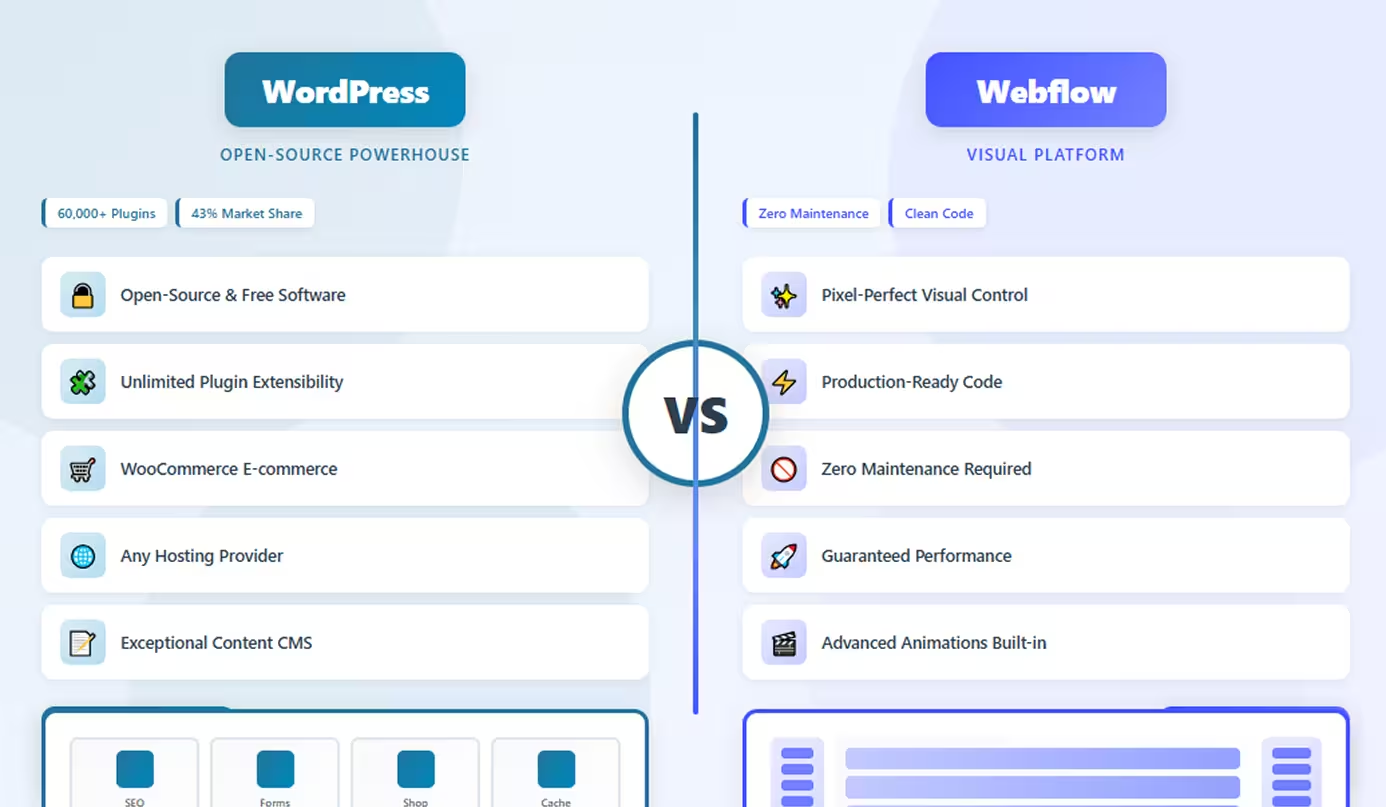
WordPress powers over 43% of all websites globally, making it the world's dominant content management system. It's an open-source platform offering unlimited customization through themes and plugins—over 60,000 plugins available. WordPress can build anything from simple blogs to complex e-commerce empires, with complete control over your hosting and code.
Webflow, conversely, is a visual development platform that generates production-quality code through an intuitive interface. It combines design freedom with managed hosting, eliminating technical maintenance while delivering pixel-perfect websites. Webflow appeals to designers and businesses wanting professional results without backend complexity.
The choice isn't about which is "better" universally—it's about which philosophy aligns with your needs, skills, and priorities. This comprehensive comparison examines ease of use, design control, performance, maintenance, and costs to help you choose wisely. Whether you're a blogger launching your first site, an agency building client projects, or a business creating your digital presence, understanding these platforms' fundamental differences ensures you invest in the right foundation for long-term success.
WordPress: The Open-Source Powerhouse
WordPress has evolved from a simple blogging platform into the world's most powerful and flexible CMS, capable of building virtually any type of website.
What WordPress Offers
Open-Source Freedom: WordPress is free software you can download, modify, and use without restrictions. You own your code and data completely. This openness has created an enormous ecosystem of developers, themes, and plugins.
Unlimited Extensibility: Access to 60,000+ plugins means WordPress can do virtually anything—e-commerce, memberships, forums, learning management, bookings, directories. If functionality exists, there's likely a plugin for it.
Theme Flexibility: Choose from thousands of free and premium themes ranging from simple blogs to complex business sites. Themes can be customized extensively or built from scratch with complete control.
Content Management Excellence: WordPress's block editor (Gutenberg) makes content creation intuitive. Create complex layouts with reusable blocks, manage media libraries, schedule posts, and control workflows with multiple user roles.
SEO Capabilities: WordPress offers exceptional SEO control through plugins like Yoast and RankMath. Manage meta tags, sitemaps, schema markup, and technical SEO with granular precision.
Hosting Flexibility: Choose any hosting provider from budget shared hosting ($3/month) to enterprise solutions. Switch hosts anytime without platform restrictions.
Developer-Friendly: WordPress provides complete code access. Developers can customize everything using PHP, JavaScript, and CSS. The REST API enables headless implementations.
Ideal Use Cases
- Blogs and content sites of any scale
- E-commerce stores with WooCommerce
- Membership and community sites
- Multi-author publications and magazines
- Complex websites requiring custom functionality
- Projects needing specific plugins or integrations
- Businesses wanting hosting control and ownership
Limitations
WordPress requires technical maintenance including updates, backups, security monitoring, and troubleshooting. Performance depends on hosting quality and optimization efforts. Plugin conflicts can cause issues. The learning curve for advanced customization is significant.
Webflow: Visual Development Platform
Webflow empowers designers to create production-quality websites through visual tools that generate clean, professional code automatically.
What Webflow Delivers
Visual Design Control: Webflow provides pixel-perfect control over every design element through a visual interface. Design with the precision of code without writing any—control spacing, typography, animations, and responsive behavior visually.
Production-Quality Code: Unlike page builders, Webflow generates clean, semantic HTML and CSS matching hand-coded quality. The code is optimized, accessible, and follows modern web standards that developers respect.
Managed Hosting: Webflow includes enterprise-grade hosting with global CDN, automatic SSL, image optimization, and 99.99% uptime. No server management, security patches, or performance optimization needed.
Advanced Interactions: Create sophisticated animations including scroll-triggered effects, complex state changes, and timed sequences without JavaScript. Professional motion design capabilities built-in.
Integrated CMS: The visual CMS supports custom content types, dynamic pages, and up to 25,000 items per collection. Design how content displays with complete control.
Design Systems: Build reusable components and style guides ensuring consistency. Update global elements once, and changes propagate across your entire site.
No Maintenance: Webflow handles all updates, security, and performance optimization automatically. Focus on design and content, not technical maintenance.
Perfect Scenarios
- Marketing websites requiring performance and design quality
- Design agencies building client sites efficiently
- Professional portfolios showcasing creative work
- Growing businesses wanting scalable solutions
- Projects prioritizing design excellence and speed
- Teams wanting to eliminate technical maintenance
- Sites needing advanced animations and interactions
Constraints
Webflow has a significant learning curve requiring understanding of CSS concepts. It's more expensive than basic WordPress hosting. Limited to Webflow's ecosystem—can't install third-party plugins. E-commerce capabilities are basic compared to WooCommerce.
Head-to-Head Comparison
Let's examine how WordPress and Webflow compare across critical dimensions:
Ease of Use and Learning Curve
WordPress: Moderate learning curve for basic usage—creating posts and pages is straightforward with the block editor. However, managing themes, plugins, and hosting adds complexity. Advanced customization requires technical knowledge.
Webflow: Steep initial learning curve requiring understanding of CSS concepts like flexbox, grid, and the box model. Once learned, building becomes faster. No need to learn backend management.
Winner: WordPress is easier to start blogging; Webflow is easier long-term once learned (no maintenance).
Design Flexibility and Control
WordPress: Design control depends on your theme and page builder. Premium page builders (Elementor, Divi) offer extensive visual control but add complexity. Custom themes provide unlimited control but require coding.
Webflow: Offers pixel-perfect, professional-level control over every design element through visual tools. Create any layout possible with CSS without writing code. No theme constraints.
Winner: Webflow provides superior visual design control; WordPress offers more flexibility through custom coding.
Customization and Extensibility
WordPress: Unmatched extensibility with 60,000+ plugins covering every imaginable feature. Add functionality through plugins without coding. Custom development enables anything.
Webflow: Limited to native features and custom code embeds. No plugin ecosystem. Advanced functionality requires custom coding or third-party integrations via APIs.
Winner: WordPress dominates with vast plugin ecosystem; Webflow is limited to built-in features.
Performance and Speed
WordPress: Performance varies dramatically based on hosting, theme optimization, plugin efficiency, and caching configuration. Can be extremely fast or frustratingly slow depending on setup.
Webflow: Delivers consistent, exceptional performance with fast loading times, automatic CDN delivery, optimized code, and excellent Core Web Vitals scores (typically 90+ Lighthouse).
Winner: Webflow provides guaranteed performance; WordPress requires expertise to optimize.
Maintenance and Updates
WordPress: Requires ongoing maintenance including core updates, plugin updates, theme updates, security monitoring, backups, and troubleshooting compatibility issues. Time investment or managed services needed.
Webflow: Zero maintenance required. Webflow handles all updates, security, performance optimization, and hosting infrastructure automatically. Set-it-and-forget-it approach.
Winner: Webflow eliminates maintenance entirely; WordPress demands regular attention.
Cost Structure
WordPress:
- Software: Free (open-source)
- Hosting: $3-500+/month (varies widely)
- Theme: $0-200 (one-time or annual)
- Plugins: $0-1000+/year (depending on needs)
- Maintenance: DIY or $50-500+/month
Total: Highly variable ($5-2000+/month depending on choices)
Webflow:
- Basic: $14/month per site
- CMS: $23/month per site
- Business: $39/month per site
- Includes hosting, SSL, CDN, updates
Total: Predictable ($14-39/month all-in for most sites)
Winner: WordPress can be cheaper but costs vary; Webflow offers predictable all-in pricing.
Content Management
WordPress: Exceptional content management with intuitive block editor, scheduling, revisions, multi-author workflows, categories, tags, and extensive media management. Built for publishing.
Webflow: Good visual CMS with custom content types and dynamic pages. Less intuitive for non-designers. Better for structured content than long-form publishing.
Winner: WordPress excels for content-heavy sites and publishing workflows.
When to Choose WordPress
Choose WordPress when you need to:
- Build content-heavy sites with extensive publishing workflows
- Create e-commerce stores with WooCommerce's advanced features
- Require specific plugins or third-party integrations
- Need hosting flexibility to switch providers anytime
- Want unlimited customization through code access
- Build membership sites, forums, or learning platforms
- Manage multi-author content with complex workflows
- Have technical resources for maintenance and optimization
- Prioritize plugin ecosystem over design tools
- Work with existing WordPress infrastructure or developers
WordPress excels when flexibility, extensibility, and content management matter more than design precision and maintenance convenience, especially for publishing-focused sites.
When to Choose Webflow
Choose Webflow when you need to:
- Create pixel-perfect, custom designs with professional quality
- Build high-performance marketing sites with guaranteed speed
- Eliminate technical maintenance and hosting management
- Develop visually complex sites with advanced animations
- Work as a designer or agency building client sites
- Learn web development skills through visual tools
- Need predictable, all-in pricing without hidden costs
- Prioritize design excellence over plugin flexibility
- Want production-ready code that's clean and semantic
- Build sites where visual design is the primary focus
Webflow is ideal when design quality, performance, and zero-maintenance justify the learning investment and higher base cost, particularly for marketing-focused sites.
Conclusion
WordPress and Webflow represent fundamentally different approaches to web development. WordPress excels at unlimited flexibility with its massive plugin ecosystem and content management excellence—perfect for blogs, e-commerce, and complex sites requiring specific functionality.
Webflow dominates visual design control with pixel-perfect precision, zero maintenance, and guaranteed performance—ideal for marketing sites, portfolios, and design-focused projects.
The choice becomes clear once you assess priorities: choose WordPress for extensibility and content when you need plugins, complex functionality, or run content-heavy sites. Choose Webflow for design and simplicity when visual quality, performance, and zero maintenance justify the learning curve.
For bloggers, publishers, and e-commerce, WordPress's ecosystem and content tools are unmatched. For designers, agencies, and marketing sites, Webflow's design capabilities and maintenance-free operation deliver superior value.
Neither platform is universally "better"—each excels at its intended purpose. Your decision should align with whether flexibility and plugins or design control and simplicity matter more to your specific situation and long-term goals.
FAQs
Q: Can I migrate from WordPress to Webflow or vice versa?
A: Migration is possible but requires rebuilding your design. Content can transfer, but you'll recreate layouts and functionality. Neither offers automatic migration tools. WordPress to Webflow means losing plugin functionality; Webflow to WordPress means adding maintenance responsibilities.
Q: Which is better for SEO?
A: WordPress offers more SEO tools and plugins (Yoast, RankMath) with granular control. Webflow provides excellent technical SEO automatically with fast loading and clean code. Both can rank well—WordPress has more SEO features; Webflow has better technical foundation.
Q: Is Webflow worth the higher cost compared to cheap WordPress hosting?
A: Cheap WordPress hosting ($5/month) requires optimization work, maintenance time, and often poor performance. Webflow's $14-39/month includes enterprise hosting, security, updates, and guaranteed performance. Compare total cost including time—Webflow often costs less when accounting for maintenance.
Q: Can WordPress match Webflow's visual design control?
A: Premium WordPress page builders (Elementor Pro, Divi) offer extensive visual control approaching Webflow's capabilities. However, they add complexity, performance overhead, and still require theme/plugin management. Webflow's native visual control is cleaner and more integrated.
Q: Which platform is more future-proof?
A: WordPress's market dominance and open-source nature ensure longevity—it will exist decades from now. Webflow depends on the company's success but is well-funded and growing. WordPress offers independence; Webflow offers platform stability. Both are safe long-term investments with different risk profiles.