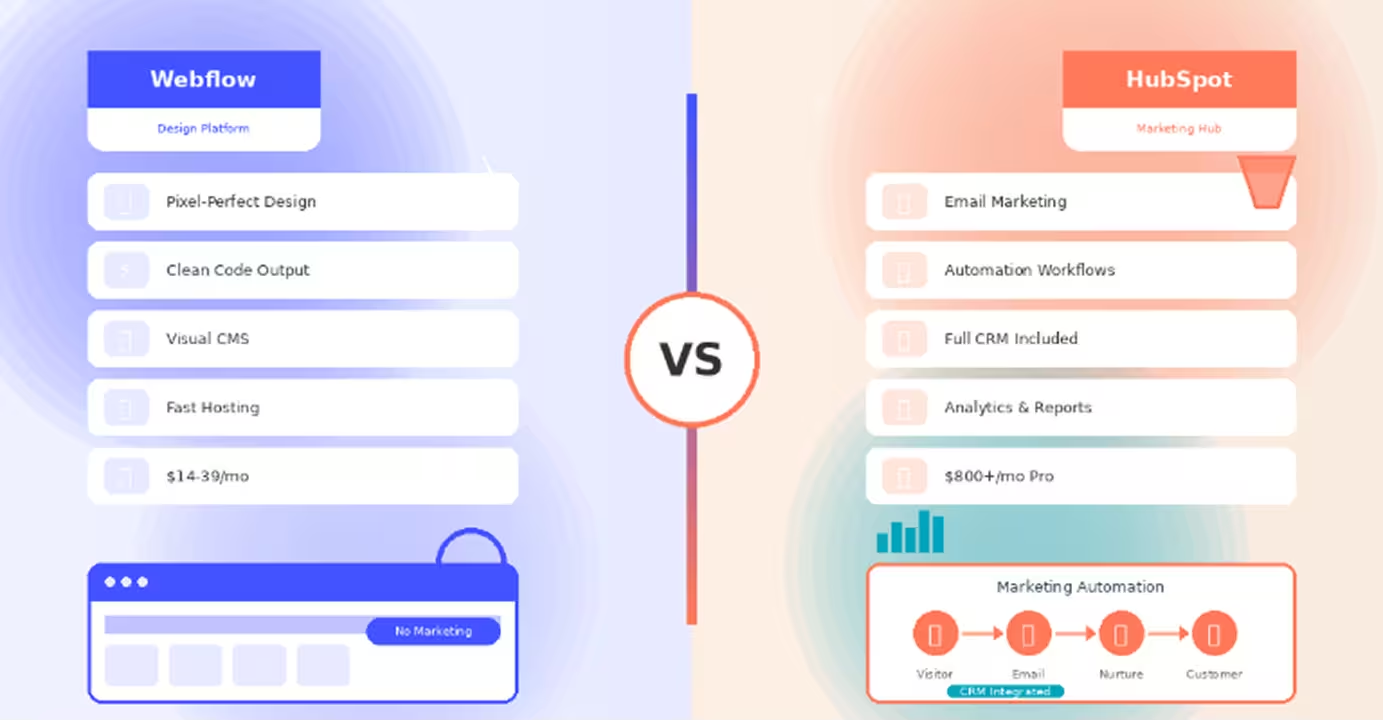
- Webflow is a website builder focused on design and performance, while HubSpot is a complete marketing platform with CMS included
- HubSpot dominates marketing automation with email campaigns, workflows, lead scoring, and nurturing that Webflow completely lacks
- Webflow offers superior design control with pixel-perfect precision that HubSpot's template-based CMS cannot match
- HubSpot includes full CRM and sales tools, while Webflow has no native customer relationship management
- Webflow costs $14-39/month per site, while HubSpot Marketing Hub starts at $45/month and scales to $800-3,200/month
- Webflow delivers better website performance with faster loading times and excellent Core Web Vitals automatically
- HubSpot provides comprehensive analytics including attribution, conversion funnels, and ROI tracking across all marketing
- Choose Webflow for design-focused websites, portfolios, and projects prioritizing visual excellence
- Choose HubSpot for marketing operations requiring automation, CRM integration, and unified customer data
- Many companies use both strategically: Webflow for their website, HubSpot for marketing automation and CRM
Introduction
Choosing between Webflow and HubSpot isn't comparing apples to apples—it's deciding whether you need a design-focused website platform or a comprehensive marketing and sales ecosystem. Understanding this fundamental difference is crucial to making the right investment.
Webflow is a visual website builder that excels at creating beautiful, fast-loading websites with pixel-perfect design control. It's the designer's choice for building stunning marketing sites, portfolios, and content-driven websites without code.
HubSpot, conversely, is a complete inbound marketing platform that happens to include CMS functionality. It's built for marketing teams executing multi-channel campaigns, managing leads, automating workflows, and tracking the entire customer journey from visitor to customer.
Both offer CMS capabilities, but that's where similarities end. This comprehensive comparison examines their strengths across design, marketing automation, CRM integration, content management, and pricing to help you determine which platform serves your business goals. Whether you're a design agency, marketing team, or growing business, understanding these platforms' true purposes ensures you choose the right foundation.
Webflow: Design-First Website Platform
Webflow is a visual development platform that transforms design into production-ready websites. It's built for creating exceptional web experiences with designer-level control.
What Webflow Offers
Pixel-Perfect Design Control: Webflow provides unprecedented visual control over every design element. The interface maps directly to CSS properties, giving you complete precision over typography, spacing, animations, and responsive behavior without writing code.
Production-Grade Code: Unlike many builders, Webflow generates clean, semantic HTML and CSS that rivals hand-coded websites. The code is optimized, accessible, and follows web standards—developers respect Webflow's output quality.
Integrated CMS: Built-in content management system perfect for blogs, portfolios, case studies, and dynamic content. Create custom content types (Collections) with up to 25,000 items per collection and design exactly how content appears.
Advanced Interactions: Create sophisticated animations including scroll-triggered effects, timed sequences, and complex state changes—all visually without JavaScript. Professional motion design capabilities are built into the platform.
Managed Hosting: Fast, global CDN hosting included with automatic SSL certificates, backups, image optimization, and excellent Core Web Vitals scores. No server management or technical maintenance required.
Ideal Use Cases
- Marketing websites and landing pages requiring design excellence
- Portfolio sites for agencies and creative professionals
- Company websites with blogs and resource centers
- E-commerce stores (basic to medium complexity)
- Projects where design quality and performance are paramount
Limitations
Webflow focuses on websites, not marketing automation. It has no email marketing, no lead scoring, no workflow automation, and minimal CRM functionality. Marketing teams need to integrate third-party tools for campaigns, analytics beyond basic metrics, and customer relationship management.
HubSpot: All-in-One Marketing Hub
HubSpot is a comprehensive inbound marketing platform providing CMS, CRM, marketing automation, sales tools, and analytics in one integrated ecosystem.
What HubSpot Delivers
Marketing Automation: Powerful email marketing and automation with workflows, lead nurturing campaigns, A/B testing, and personalization. Build complex marketing funnels that guide prospects through the buyer's journey automatically.
Complete CRM: Built-in customer relationship management tracking every interaction—website visits, email opens, form submissions, and sales calls. See complete customer timelines and behavior patterns.
Sales Tools: Pipeline management, email tracking, meeting scheduling, and sales automation. Sales teams get tools for outreach, follow-ups, and closing deals directly integrated with marketing data.
Content Management: HubSpot CMS allows creating websites, blogs, and landing pages with drag-and-drop editing. While less design-flexible than Webflow, it integrates seamlessly with marketing and CRM data.
Analytics and Reporting: Comprehensive marketing analytics tracking ROI, campaign performance, conversion funnels, and attribution. Understand which marketing efforts drive revenue with detailed reporting.
Integrated Ecosystem: Everything connects—marketing, sales, and service share the same database. Lead tracking flows automatically from website visit through closed deal to customer support.
Perfect Scenarios
- Marketing teams executing multi-channel campaigns
- B2B companies with longer sales cycles requiring nurturing
- Growing businesses needing integrated marketing and sales
- Organizations wanting unified customer data
- Teams requiring marketing automation and workflows
Constraints
HubSpot's CMS offers limited design flexibility compared to dedicated website builders. Achieving pixel-perfect, custom designs is challenging. The platform can be complex and expensive at scale, with pricing increasing as contact lists and feature needs grow.
Head-to-Head Comparison
Let's examine how Webflow and HubSpot compare across critical dimensions:
Primary Purpose and Focus
Webflow: Built for creating beautiful websites with design precision and performance. The focus is visual web design and content presentation with clean code output.
HubSpot: Built for inbound marketing execution—attracting visitors, converting leads, closing customers, and delighting them post-purchase. The website is one component of a larger marketing machine.
Winner: Neither—they serve different primary purposes. Webflow for website design, HubSpot for marketing operations.
Design and Customization
Webflow: Offers pixel-perfect design control with a visual interface mapping to CSS. Create any layout possible with code, all through visual tools. Design freedom is exceptional.
HubSpot: Provides template-based design with modules and drag-and-drop editing. Customization is more limited—achieving unique, custom designs requires HubSpot developers and can be costly.
Winner: Webflow dramatically outperforms HubSpot in design capabilities and creative freedom.
Marketing Automation Capabilities
Webflow: Has no native marketing automation. Email marketing, lead nurturing, and workflow automation require third-party integrations (Mailchimp, ActiveCampaign, etc.).
HubSpot: Includes comprehensive marketing automation—email campaigns, workflow builders, lead scoring, personalization, and multi-touch campaign orchestration. This is HubSpot's core strength.
Winner: HubSpot dominates marketing automation; Webflow isn't designed for this purpose.
CRM and Sales Tools
Webflow: Offers no CRM functionality. Customer relationship management requires integrating tools like Salesforce, Pipedrive, or HubSpot CRM.
HubSpot: Provides a full-featured CRM tracking contacts, companies, deals, and interactions. Sales tools include email tracking, meeting scheduling, pipeline management, and sales automation.
Winner: HubSpot offers complete CRM and sales tools; Webflow has none natively.
Content Management
Webflow: Excellent content management with custom content types, visual design control over content presentation, and up to 25,000 items per collection. Perfect for content-driven websites.
HubSpot: Good content management integrated with marketing data—personalize content based on visitor behavior, track content performance, and optimize for conversions using built-in analytics.
Winner: Webflow for design-driven content; HubSpot for marketing-optimized content.
Analytics and Reporting
Webflow: Basic website analytics showing page views, traffic sources, and basic metrics. Advanced analytics require Google Analytics integration or third-party tools.
HubSpot: Comprehensive marketing analytics including attribution reporting, conversion funnel analysis, campaign ROI tracking, and detailed customer journey insights across all touchpoints.
Winner: HubSpot provides enterprise-level marketing analytics; Webflow offers basic website stats.
Pricing Structure
Webflow:
- Basic: $14/month per site (includes hosting)
- CMS: $23/month per site
- Business: $39/month per site
- Enterprise: Custom pricing
HubSpot:
- Free CRM: Basic features
- Starter: $45/month (Marketing Hub)
- Professional: $800/month (Marketing Hub)
- Enterprise: $3,200/month (Marketing Hub)
- CMS Hub: Separate pricing starting at $23/month
Winner: Webflow is dramatically more affordable for website needs; HubSpot justifies higher costs with comprehensive marketing tools.
When to Choose Webflow
Choose Webflow when you need to:
- Build beautiful, high-performance websites with design control
- Create marketing sites and landing pages focused on presentation
- Develop portfolio or agency websites showcasing creative work
- Launch company websites with blogs and resource centers
- Prioritize design quality, speed, and SEO above all
- Want predictable, affordable pricing for website infrastructure
- Need pixel-perfect design control without coding
- Avoid the complexity and cost of marketing platforms
- Focus on website excellence rather than marketing automation
- Work with design-focused teams or agencies
Webflow excels when your primary need is an exceptional website and you'll handle marketing through other specialized tools or don't require extensive automation.
When to Choose HubSpot
Choose HubSpot when you need to:
- Execute inbound marketing campaigns across multiple channels
- Implement marketing automation and lead nurturing
- Manage customer relationships with integrated CRM
- Track complete customer journeys from first visit to closed deal
- Need unified marketing, sales, and service platforms
- Require detailed marketing analytics and attribution
- Build scalable marketing operations with workflows
- Integrate all customer data in one system
- Focus on lead generation and conversion optimization
- Have marketing budgets supporting platform investment
HubSpot is ideal when marketing automation, CRM integration, and comprehensive analytics are essential to your business strategy, and website design is secondary to marketing function.
Conclusion
Webflow and HubSpot serve fundamentally different purposes despite both offering CMS capabilities. Webflow excels at creating beautiful, fast-loading websites with exceptional design control and affordable pricing. HubSpot dominates inbound marketing execution with automation, CRM, sales tools, and analytics—though at significantly higher cost.
The choice is usually clear once you identify your primary need: choose Webflow for website excellence and design-focused projects. Choose HubSpot for marketing operations requiring automation, CRM, and integrated tools.
Many successful companies use both: Webflow for their marketing website (design quality and performance) and HubSpot for marketing automation, CRM, and campaign management. This combination delivers best-in-class website experience while maintaining powerful marketing operations.
The "better" platform depends entirely on whether your priority is website design or marketing automation. Both excel at their core purposes—choose based on your primary business need.
FAQs
Q: Can I use Webflow with HubSpot together?
A: Yes, many companies integrate them. Use Webflow for your website design and hosting, then embed HubSpot forms, chatbots, and tracking codes. HubSpot can track visitor behavior on Webflow sites, though some advanced features require custom integration work.
Q: Which platform is better for SEO?
A: Webflow typically produces better technical SEO with faster loading times, cleaner code, and excellent Core Web Vitals scores. HubSpot offers more SEO tools and recommendations but may load slower. For pure technical SEO performance, Webflow has an edge.
Q: Is HubSpot's CMS as good as Webflow for building websites?
A: No. HubSpot CMS is functional but limited in design flexibility compared to Webflow. If website design quality is your priority, Webflow is superior. HubSpot CMS excels at marketing integration and personalization, not design freedom.
Q: Does Webflow offer any marketing automation features?
A: Webflow has minimal marketing features—basic forms and email collection. For email marketing, automation, and campaigns, you must integrate third-party tools like Mailchimp, ConvertKit, or ironically, HubSpot's marketing tools.
Q: Which platform is more cost-effective?
A: For websites alone, Webflow is dramatically cheaper ($14-39/month per site). HubSpot becomes expensive quickly ($800+/month for Professional Marketing Hub). However, if you need marketing automation, HubSpot consolidates multiple tools into one platform, potentially saving money versus buying separate website, email, CRM, and automation tools.