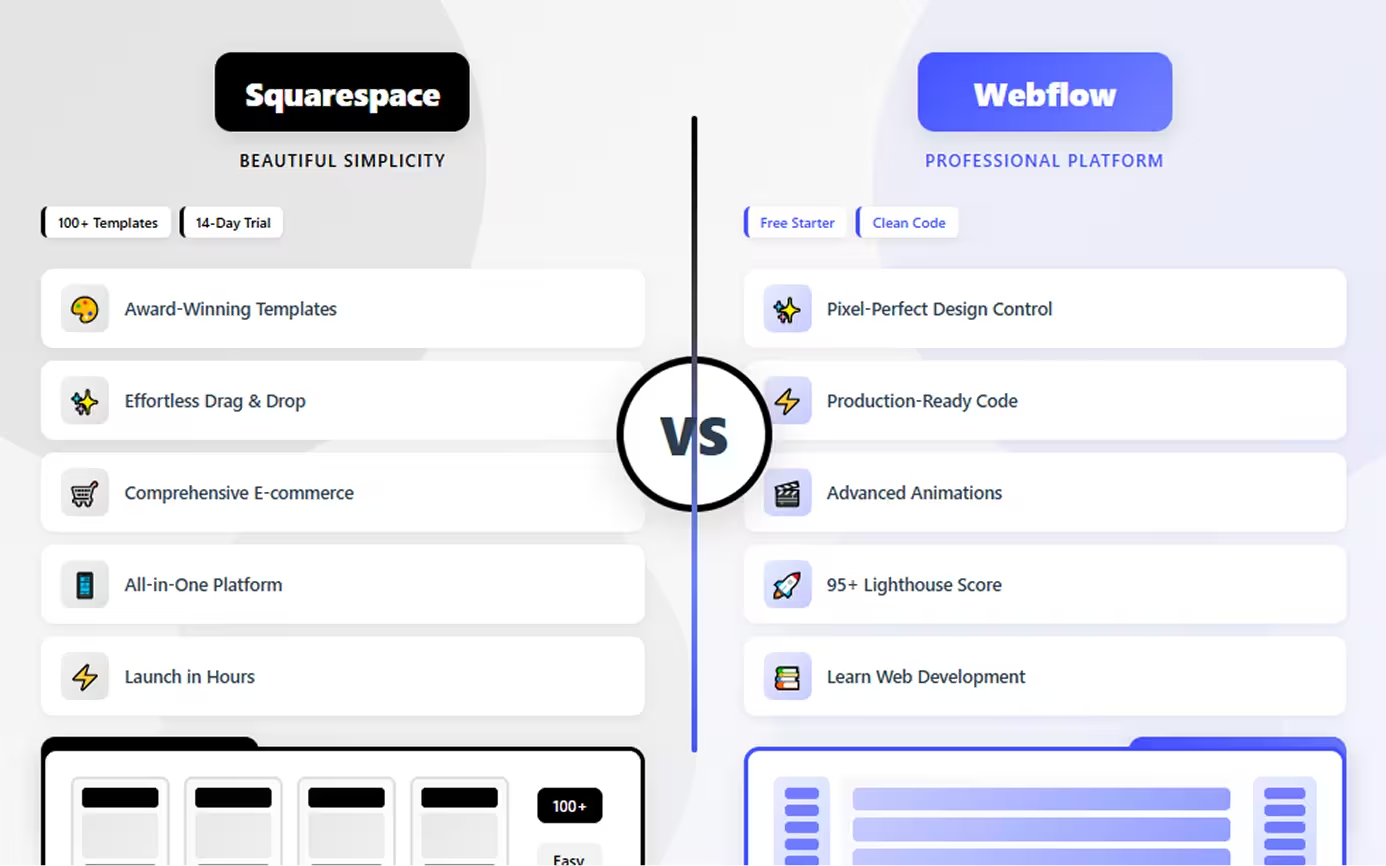
- Squarespace prioritizes beautiful simplicity** with award-winning templates, while Webflow offers professional design control with unlimited flexibility
- Webflow delivers superior performance** with faster loading times and better Core Web Vitals scores than Squarespace
- Squarespace is dramatically easier** to learn and use, perfect for beginners, while Webflow requires understanding CSS concepts
- Squarespace offers better e-commerce** with more comprehensive features and lower transaction fees than Webflow
- Webflow provides pixel-perfect design control** creating any layout possible, while Squarespace customizes within template boundaries
- Both platforms cost similarly** ($14-49/month range) with Squarespace including more features at entry levels
- Squarespace has superior native integrations** for common tools, while Webflow requires more technical integration work
- Choose Squarespace for creative portfolios**, restaurants, and businesses wanting beautiful results immediately without technical learning
- Choose Webflow for professional design work**, agencies, and marketing sites where control and performance justify learning investment
- Template quality**: Squarespace templates are more refined out-of-box; Webflow templates offer complete customization freedom
Introduction
Choosing between Webflow and Squarespace represents a decision between professional design control and effortless beauty. Both platforms target design-conscious users but approach website creation from fundamentally different philosophies.
Squarespace has perfected the art of beautiful, template-based design with intuitive editing that anyone can master. It's the platform for creatives, small businesses, and anyone who wants a stunning website without technical complexity. With award-winning templates and seamless integrations, Squarespace makes professional design accessible.
Webflow, conversely, is a visual development platform offering pixel-perfect design control and production-quality code. It appeals to designers, agencies, and businesses that need complete creative freedom without coding. Webflow's learning curve is steeper, but the design possibilities are virtually unlimited.
Both create beautiful websites, but they serve different needs and skill levels. This comprehensive comparison examines design flexibility, ease of use, templates, e-commerce, performance, and pricing to help you choose wisely. Whether you're a photographer launching a portfolio, an agency building client sites, or a business creating your online presence, understanding these platforms' strengths ensures you invest in the right foundation.
Squarespace: Design-Forward Simplicity
Squarespace combines award-winning design templates with intuitive editing, making it the go-to platform for creatives who value aesthetics and simplicity.
What Squarespace Offers
Beautiful Templates: Squarespace's professionally designed templates are renowned for their visual appeal. Every template is modern, mobile-responsive, and thoughtfully crafted—perfect for photographers, artists, restaurants, and creative professionals.
Intuitive Editing: The drag-and-drop editor strikes a balance between simplicity and customization. Make changes visually, preview instantly, and publish confidently—no technical knowledge required.
All-in-One Platform: Squarespace includes hosting, domains, email marketing, analytics, and 24/7 customer support. Everything you need to run your website lives in one place with one login.
Built-in Features: Integrated blogging, portfolios, scheduling, memberships, and marketing tools eliminate the need for third-party plugins. The platform handles common needs out of the box.
E-commerce Integration: Sell physical products, digital downloads, or services with built-in e-commerce including inventory management, shipping calculations, and payment processing.
Professional Polish: Squarespace templates emphasize typography, spacing, and visual hierarchy—the design fundamentals that make websites look professionally crafted without effort.
Ideal Use Cases
- Creative portfolios (photographers, designers, artists)
- Small business websites emphasizing visual appeal
- Restaurants and hospitality showcasing ambiance
- Bloggers and writers prioritizing content presentation
- Service businesses needing booking and scheduling
- Anyone wanting beautiful results without design expertise
Limitations
Squarespace offers less design flexibility than professional platforms. Achieving truly custom designs requires CSS knowledge. Template switching after launch can be challenging. Advanced customization is limited compared to platforms offering complete design control.
Webflow: Professional Design Platform
Webflow empowers designers with professional-grade tools to create pixel-perfect websites through a visual interface that generates production-ready code.
What Webflow Delivers
Pixel-Perfect Control: Webflow provides complete design freedom over every element. Control spacing, typography, animations, and responsive behavior with precision typically requiring code—all through visual tools.
Production-Quality Code: Unlike most builders, Webflow generates clean, semantic HTML and CSS matching hand-coded quality. The code is optimized, accessible, and follows modern web standards.
Advanced Interactions: Create sophisticated animations including scroll-triggered effects, complex state changes, and timed sequences without JavaScript. Professional motion design capabilities are built-in.
Powerful CMS: The integrated content management system supports custom content types, dynamic pages, and up to 25,000 items per collection—ideal for blogs, portfolios, and content-driven sites.
Design System Capabilities: Build reusable components and style guides ensuring consistency across your site. Update global elements once, and changes propagate everywhere.
Fast Performance: Webflow includes global CDN hosting with automatic SSL, image optimization, and excellent Core Web Vitals scores delivering professional performance.
Perfect Scenarios
- Design agencies building client websites
- Professional designers needing creative control
- Marketing sites requiring performance and flexibility
- Growing businesses wanting scalable solutions
- Portfolio sites showcasing design excellence
- Projects where design quality justifies learning investment
Constraints
Webflow requires understanding CSS concepts like flexbox, grid, and the box model. The learning curve is significant—expect weeks to months becoming proficient. It's more expensive than beginner platforms and demands technical learning.
Head-to-Head Comparison
Let's examine how Squarespace and Webflow compare across critical dimensions:
Design Flexibility and Control
Squarespace: Offers good customization within templates. Adjust colors, fonts, spacing, and layouts using visual controls. Templates are beautiful but achieving designs outside template structures requires CSS.
Webflow: Provides unlimited design freedom with pixel-perfect control over every element. Create any layout possible with CSS through visual tools. No template constraints—design exactly what you envision.
Winner: Webflow offers professional-level design control; Squarespace provides beautiful flexibility within boundaries.
Ease of Use and Learning Curve
Squarespace: Extremely user-friendly with intuitive editing. Most users launch websites within hours. The interface is straightforward, requiring no technical knowledge.
Webflow: Requires understanding web design concepts—box model, flexbox, positioning, and responsive design. The learning curve is substantial, requiring weeks of practice.
Winner: Squarespace is dramatically easier for beginners; Webflow demands significant learning.
Templates and Customization
Squarespace: 100+ professionally designed templates across all industries. Every template is visually stunning but customization depth is moderate. Switching templates post-launch is challenging.
Webflow: Fewer templates (around 100+) but completely customizable. Templates are starting points—transform them entirely or start from scratch with no template constraints.
Winner: Squarespace for template beauty and quantity; Webflow for customization depth.
E-commerce Capabilities
Squarespace: Comprehensive e-commerce features including inventory management, variants, abandoned cart recovery, shipping rules, and point-of-sale. Strong for product-based businesses.
Webflow: Offers basic e-commerce suitable for smaller stores. Limited to 15,000 SKUs and lacks some advanced features Squarespace provides. Better for simple product catalogs.
Winner: Squarespace provides more robust e-commerce functionality for serious online stores.
Performance and SEO
Squarespace: Delivers good performance with responsive templates and built-in SEO tools. Performance is solid though not exceptional. SEO capabilities are comprehensive.
Webflow: Provides exceptional performance with faster loading times, cleaner code, and superior Core Web Vitals scores. Sites consistently achieve 90+ Lighthouse scores.
Winner: Webflow significantly outperforms Squarespace in speed and technical SEO metrics.
Pricing Structure
Squarespace:
- Personal: $16/month (basic site)
- Business: $23/month (advanced features)
- Commerce Basic: $27/month (e-commerce + 3% fees)
- Commerce Advanced: $49/month (no transaction fees)
Webflow:
- Basic: $14/month per site
- CMS: $23/month per site
- Business: $39/month per site
- E-commerce: $29+/month per site
Winner: Both similarly priced; Squarespace includes more at entry level; Webflow includes hosting.
Integration Options
Squarespace: Built-in integrations with popular services plus third-party connections through blocks. Most common needs are native—email marketing, scheduling, social media, analytics.
Webflow: Limited native integrations but supports custom code for third-party tools. Requires more technical work for integrations compared to Squarespace's plug-and-play approach.
Winner: Squarespace offers easier, more comprehensive native integrations.
When to Choose Squarespace
Choose Squarespace when you need to:
- Create beautiful websites without technical learning
- Launch quickly using award-winning templates
- Build creative portfolios (photography, art, design)
- Manage e-commerce stores with comprehensive features
- Need all-in-one simplicity with integrated tools
- Prioritize ease of use over unlimited customization
- Want professional design without CSS knowledge
- Build restaurant, hospitality, or service websites
- Require built-in blogging and content tools
- Value visual consistency from refined templates
Squarespace excels when beautiful design, ease of use, and integrated features matter more than unlimited customization, and when you want professional results immediately.
When to Choose Webflow
Choose Webflow when you need to:
- Achieve pixel-perfect, custom designs with professional quality
- Build high-performance websites with exceptional Core Web Vitals
- Create marketing sites where design and speed are critical
- Learn real web development skills while building visually
- Need complete design control without template constraints
- Work as a designer or agency building client sites
- Develop scalable solutions with sophisticated interactions
- Prioritize code quality and technical excellence
- Build sites with complex animations and advanced features
- Want design freedom that justifies learning investment
Webflow is ideal when design quality, performance, and professional control justify the learning curve, and when you're building websites as a core business activity.
Conclusion
Squarespace and Webflow both create beautiful websites but serve fundamentally different users. Squarespace excels at effortless beauty with award-winning templates and intuitive editing—perfect for creatives and businesses wanting professional results immediately.
Webflow dominates professional design control with pixel-perfect precision and production-quality code—ideal for designers, agencies, and businesses where design excellence justifies learning investment.
The choice is usually clear once you assess your priorities: choose Squarespace for beautiful simplicity when you want professional design without technical complexity. Choose Webflow for design mastery when you need complete creative control and are willing to learn.
For most creative professionals and small businesses, Squarespace delivers exceptional results with minimal effort. For designers, agencies, and marketing teams, Webflow's capabilities unlock design possibilities impossible elsewhere.
Neither platform is "better" universally—each excels at its intended purpose. Choose based on whether ease and beauty or control and performance matter more to your specific situation.
FAQs
Q: Can I migrate from Squarespace to Webflow later?
A: Technically yes, but migration requires completely rebuilding your design in Webflow. Content can export, but designs don't transfer. Neither platform offers automatic migration—expect a complete site rebuild if switching.
Q: Which platform is better for SEO?
A: Webflow typically delivers better technical SEO with faster loading times and cleaner code. However, Squarespace offers more comprehensive built-in SEO tools and guidance. Both can rank well—Webflow has technical advantages, Squarespace has easier SEO management.
Q: Is Webflow worth the learning curve?
A: If you're building websites professionally, working as a designer, or creating marketing sites where performance matters—yes, the investment pays significant dividends. For simple personal sites or one-time projects, Squarespace's simplicity is more practical.
Q: Which has better templates?
A: Squarespace templates are widely considered more beautiful and refined out-of-the-box. Webflow has quality templates but fewer options. However, Webflow templates are completely customizable while Squarespace templates have customization limits.
Q: Can Squarespace match Webflow's design flexibility?
A: No. While Squarespace offers good customization, it cannot match Webflow's pixel-perfect control and unlimited design freedom. Webflow allows creating any design possible with code; Squarespace works within template structures. For most users, Squarespace's flexibility is sufficient.