Introduction
Programmatic SEO generates thousands of valuable pages from templates and data—and Webflow's CMS makes it surprisingly accessible without developer dependency.
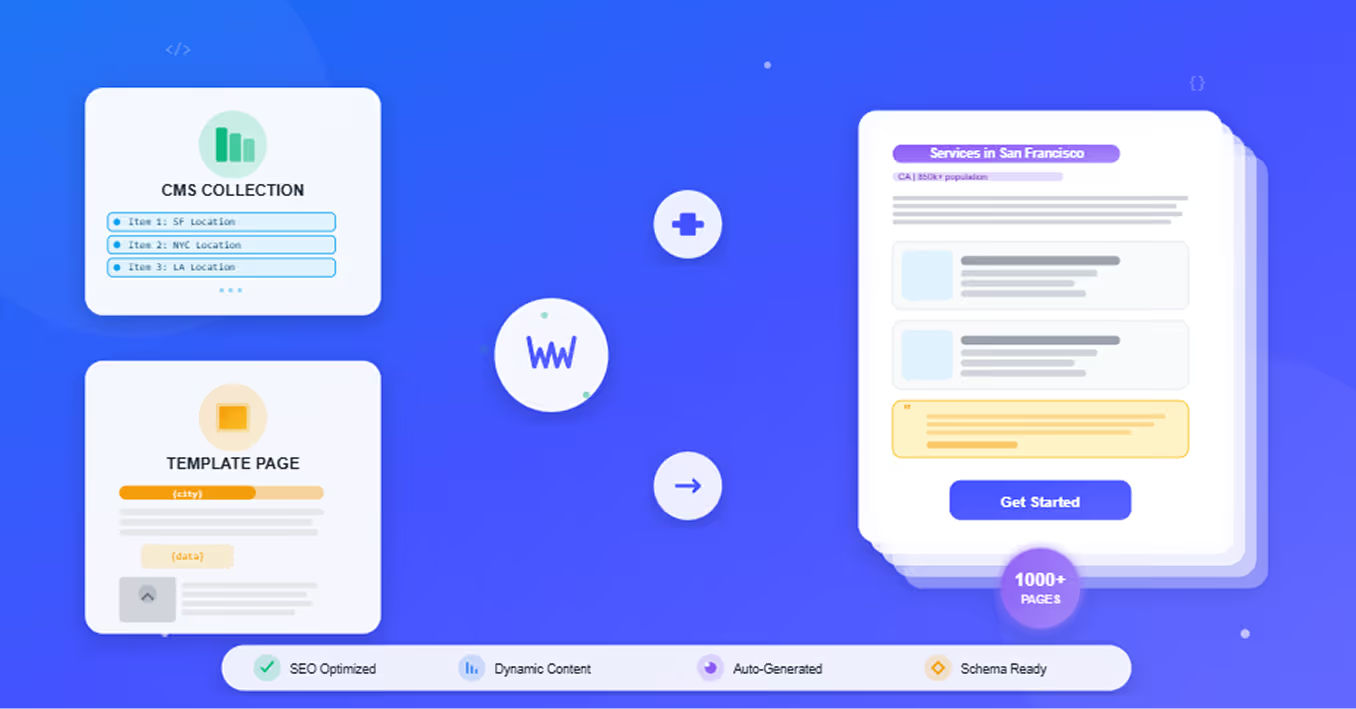
Instead of manually creating individual pages for "accountants in San Francisco," "accountants in Los Angeles," "accountants in Chicago," etc., Webflow's CMS lets you design one template, import structured data, and automatically generate hundreds or thousands of location-specific pages. Each page targets unique search intent while maintaining design consistency and SEO quality.
The Webflow advantage: Most programmatic SEO requires custom development, databases, and technical infrastructure. Webflow's visual CMS eliminates these barriers—marketers can build and deploy programmatic SEO strategies without writing code or managing servers.
Real possibilities: Generate 500 location-based service pages. Create 1,000 product variation pages. Build comprehensive comparison libraries. Scale content that would take months manually in days or weeks.
This guide walks through building programmatic SEO in Webflow from strategy to implementation—CMS structure, template design, data import workflows, SEO optimization, and quality control. Whether you're building a directory, service marketplace, product catalog, or content library, Webflow's platform supports programmatic SEO at scale. If you're looking for expert help, our Webflow development services cover everything from CMS architecture to full programmatic builds.
Why Webflow Excels at Programmatic SEO
Webflow combines the power of custom CMSs with visual, no-code accessibility—making programmatic SEO dramatically more approachable.
Native CMS Capabilities
Webflow CMS is built for dynamic content at scale:
Collection-based architecture: Create collections (think: database tables) for any content type—locations, products, services, team members, case studies. Each collection item becomes a dynamically generated page.
Unlimited items on higher plans: CMS plans support 2,000-10,000 collection items. Enterprise plans remove limits entirely. Scalability built-in for serious programmatic projects.
Rich field types: Text, rich text, images, videos, numbers, dates, references, multi-references. Structure complex data relationships without custom development.
Template-Based Design System
Design once, generate thousands of pages:
Visual template builder: Create page layouts in Webflow Designer with pixel-perfect control. No HTML/CSS coding required.
Dynamic binding: Connect template elements to collection fields visually. "Bind this heading to Location Name field" becomes automatic across all pages.
Consistent branding: Template ensures every programmatic page maintains design standards, spacing, typography, and brand identity automatically.
Dynamic Page Generation
Webflow handles page creation automatically:
Collection pages: Each collection item automatically gets its own URL and page following your template design. Add 100 items = 100 new pages instantly.
Custom URL structures: Define URL patterns like /services/[city-slug] or /products/[category]/[product-name]. Clean, SEO-friendly URLs at scale.
Real-time publishing: Changes to templates or collection items update live pages immediately (or on publish). No rebuild processes or deployment complexity.
SEO Controls at Scale
Webflow provides granular SEO management:
Field-level SEO settings: Every collection can have dedicated fields for meta titles, meta descriptions, Open Graph images. Populate once, apply to generated pages automatically.
Dynamic title patterns: Create formulas like "[Service] in [City] | [Company Name]" that auto-populate across pages using collection data.
Schema markup support: Add JSON-LD structured data to templates. Every generated page inherits proper schema automatically. To get the most from Webflow's built-in SEO features, explore the full range of our Webflow SEO services.
Sitemap generation: Webflow creates and maintains XML sitemaps automatically, including all collection pages. No manual sitemap management.
No-Code Advantages
The democratization of programmatic SEO:
Marketing team ownership: Designers and marketers build and manage programmatic content without developer dependencies or tickets.
Rapid iteration: Test template designs, adjust data, optimize instantly. No code deployments or QA cycles.
Lower costs: Eliminate custom development and ongoing maintenance. Platform handles infrastructure, hosting, security, and performance.
"Webflow democratizes programmatic SEO. What required a dev team and months of custom work now takes a marketer and days with Webflow CMS." — Digital Marketing Manager
Planning Your Programmatic SEO Strategy
Effective programmatic SEO starts with strategic planning before touching Webflow. A solid content strategy is the backbone of any scalable approach—learn how to build one in our guide to developing an SEO content strategy in Webflow.
Identifying Opportunities
Where programmatic SEO makes sense:
Location-based patterns:
- Service pages: "[Service] in [City]"
- Business directories: "[Category] in [Location]"
- Real estate: "Homes for sale in [Neighborhood]"
- Local guides: "Things to do in [Destination]"
Product/catalog variations:
- E-commerce: Product pages with size/color/style variations
- Templates: "[Template Type] for [Industry]"
- Tools: "[Tool Category] for [Use Case]"
Comparison and category pages:
- "[Product A] vs [Product B]"
- "Best [Product Category] for [Use Case]"
- "[Industry] [Tool Type] comparison"
Validation criteria:
- Real search demand exists for variations
- Unique data available per page (not just variable swapping)
- You can provide genuine value for each query
- Scale opportunity (50+ similar pages minimum)
Data Source Requirements
Programmatic SEO needs structured, quality data:
Essential data elements:
- Unique identifier for each item
- Variables for dynamic content (city name, product specs, etc.)
- Content differentiation (descriptions, features, stats)
- Media assets (images, videos)
- SEO metadata (titles, descriptions, keywords)
Data quality standards:
- Accurate and current information
- Sufficient uniqueness to avoid duplicate content
- Enough detail to create valuable pages
- Consistent formatting for clean import
Common data sources:
- Internal databases or spreadsheets
- APIs (Google Places, product databases, public datasets)
- User-generated content
- Proprietary research or surveys
Template Design Considerations
Design templates for scale and variation:
Content flexibility: Templates must accommodate varying content lengths. Some cities have 3 service providers, others have 30. Design handles both gracefully.
Conditional sections: Show/hide content blocks based on data availability. Display "Customer Reviews" section only if reviews exist for that item.
Default fallbacks: Provide default content or images when specific data missing. Prevents broken pages from incomplete data.
Mobile responsiveness: Essential—programmatic pages often target local "near me" searches from mobile users.
Scalability Planning
Plan for growth:
Start small: Launch with 50-100 pages to validate strategy before scaling to 1,000+
Resource requirements:
- Initial template design: 20-40 hours
- Data preparation and cleanup: varies by source complexity
- Ongoing content updates: plan for maintenance cycles
Quality control process: How will you review page quality? Sample checking? Automated monitoring?
Technical limits: Webflow CMS plans have item limits. Understand your tier (2,000-10,000 items standard, unlimited Enterprise).
Building Your CMS Structure
Webflow CMS structure determines your programmatic SEO capabilities.
Collection Setup for Programmatic Content
Create collections matching your content model:
Example: Location-based service pages
Collection: "Service Locations"
Fields to create:
- Name (Text): "San Francisco"
- Slug (Slug): "san-francisco" (auto-generated URL)
- State/Region (Text): "California"
- Description (Rich Text): Unique description for this location
- Services Available (Multi-Reference): Links to Services collection
- Team Members (Reference): Links to Team collection
- Hero Image (Image): Location-specific imagery
- Stats/Data (Number fields): Population, market size, etc.
- Meta Title (Text): SEO title pattern
- Meta Description (Plain Text): SEO description
- Schema Markup (Code): Location-specific JSON-LD
Field Types and Data Organization
Choose appropriate field types:
Text fields: Short content like names, titles, simple descriptions
Rich Text fields: Formatted content with headings, lists, bold, links (blog-style content)
Number fields: Statistics, prices, quantities, ratings
Image fields: Photos, graphics, Open Graph images
Reference fields (critical for programmatic SEO): Link one collection item to another
- Example: Link "Service Location" to related "Team Members"
- Creates dynamic relationships across content
Multi-Reference fields: Link to multiple items from another collection
- Example: One location page shows multiple services offered
- Enables complex content relationships
Option fields: Dropdown selections for categorization
Date fields: Publish dates, event dates, last updated timestamps
Reference Fields for Relationships
Building content relationships:
Example content model:
Collections:
- Locations (primary programmatic collection)
- Services (what you offer)
- Team Members (local staff)
- Testimonials (customer reviews)
Relationships:
- Locations → Services (Multi-Reference): "Which services available in this location?"
- Locations → Team Members (Reference): "Who leads this location?"
- Locations → Testimonials (Multi-Reference): "What do customers say about this location?"
Dynamic content benefits: Location page automatically displays relevant services, team bios, and reviews based on collection relationships. Update once, reflects everywhere.
Multi-Reference for Taxonomy
Create flexible taxonomies:
Example: Product catalog
Collections:
- Products (main programmatic collection)
- Categories (product types)
- Features (product attributes)
- Use Cases (applications)
Multi-References:
- Products → Categories: "This product belongs to these categories"
- Products → Features: "This product has these features"
- Products → Use Cases: "This product works for these use cases"
Navigation and filtering: Multi-reference fields enable dynamic filtering UI. Users can filter products by category, feature, or use case—all powered by CMS relationships.
Conditional Visibility Rules
Show/hide content based on data:
Use case: Not every location has testimonials yet. Don't show empty "Reviews" section.
Implementation:
- Add "Has Reviews?" switch field to collection
- Set conditional visibility on testimonials section: Only show when "Has Reviews?" = True
- Or check if Testimonials reference field is populated
Benefits: Clean pages even with incomplete data. Pages look polished whether you have 1 data point or 20.
Creating Dynamic Templates
Templates transform collection data into beautiful programmatic pages.
Template Page Design
Designing collection templates in Webflow:
- Create Collection Template Page: In Webflow Designer, create new page and select "Collection Page" type
- Choose collection: Link template to your collection (e.g., "Service Locations")
- Design page layout: Add sections, containers, typography, images like normal page design
- Bind dynamic content: Instead of static text/images, bind to collection fields
Dynamic Field Binding
Connecting template elements to data:
Binding process:
- Select element (heading, paragraph, image, etc.)
- Click "Get text/image/link from [Collection Name]"
- Choose collection field to populate this element
- Repeat for all dynamic content
Example bindings:
- H1 heading → "Name" field: Displays location name
- Paragraph → "Description" field: Displays location description
- Image → "Hero Image" field: Displays location-specific photo
- Link → "URL Slug" field: Creates navigation links
Fallback content: Set default text that shows if field is empty. Prevents blank elements from breaking design.
SEO Field Automation
Populate SEO settings dynamically:
Page Settings panel (when collection template open):
Meta Title: Bind to "Meta Title" field
- Field value example: "[Service] in [City] | Company Name"
- Auto-populates unique title per page
Meta Description: Bind to "Meta Description" field
- Field value example: "Looking for [service] in [city]? We provide [key benefits]. Get a free quote today."
- Unique descriptions at scale
Open Graph Image: Bind to "OG Image" field
- Upload location or product-specific images
- Social sharing shows relevant imagery automatically
Conditional Content Blocks
Show content only when data exists:
Example: Testimonials section should only appear if location has reviews.
Implementation:
- Wrap testimonials section in div
- Add conditional visibility setting
- Set condition: "Show only if Testimonials field is not empty"
- Section disappears on pages without testimonials
Use cases:
- Show pricing table only if pricing data exists
- Display team section only if team members assigned
- Show related products only if related items exist
Reusable Components
Build component library for programmatic templates:
Create components:
- Service cards
- Testimonial blocks
- Team member bios
- CTA sections
- FAQ accordions
Benefits:
- Update component once, changes reflect across all programmatic pages
- Maintain consistency automatically
- Faster template building with pre-built blocks
Implementing at Scale
Getting data into Webflow CMS efficiently.
Importing Data Efficiently
Webflow provides multiple import methods:
CSV Import (native Webflow feature):
- Prepare data in spreadsheet (Google Sheets, Excel)
- Export as CSV
- Import via Webflow CMS panel
- Map CSV columns to collection fields
- Validate and publish
Limitations: Basic imports only. Complex relationships require careful planning.
CSV Upload Workflows
Step-by-step CSV import:
- Prepare data: Clean spreadsheet with columns matching collection fields
- Column: "Name" → Collection field: "Name"
- Column: "Description" → Field: "Description"
- Column: "Image_URL" → Field: "Hero Image" (Webflow fetches from URL)
- Export CSV: Save spreadsheet as .csv file
- Import in Webflow:
- Open CMS collection
- Click "Import" button
- Upload CSV
- Map columns to fields
- Preview and validate
- Publish: Review sample pages, then publish collection
Best practices:
- Import in batches (100-500 items at a time) for easier error handling
- Test with 10-item subset first
- Clean data before import (remove special characters, validate URLs)
Airtable/Make.com Integrations
Advanced automation for ongoing updates:
Airtable + Webflow:
- Store master data in Airtable (easier editing interface)
- Use Zapier, Make.com, or Whalesync to sync Airtable → Webflow CMS
- Automatic updates when Airtable data changes
- Team edits data in Airtable, Webflow pages update automatically
API integrations:
- Webflow provides REST API for programmatic content management
- Build custom integrations pulling from your data sources
- Automate content updates on schedules
Use cases:
- Real-time pricing updates from product database
- Location data from Google Places API
- User-generated content moderation and publishing
Quality Control Processes
Maintaining quality at scale:
Pre-launch review:
- Check 10-20 sample pages across data variations
- Verify template handles edge cases (long titles, missing data, etc.)
- Test mobile responsiveness
- Confirm SEO metadata populating correctly
Monitoring:
- Google Search Console: Track crawl errors, indexation status
- Analytics: Monitor bounce rates, time on site for programmatic pages
- Spot checks: Regular manual review of random pages
Continuous improvement:
- Identify underperforming page patterns
- Update templates to improve UX
- Refresh stale data quarterly
Staged Rollout Approach
Launch strategy:
Phase 1: Pilot (50-100 pages)
- Create template and import small data set
- Test thoroughly
- Gather performance data for 2-4 weeks
- Identify issues and refine
Phase 2: Expansion (500-1,000 pages)
- Scale successful template
- Monitor performance metrics
- Optimize based on learnings
Phase 3: Full Deployment (1,000+ pages)
- Deploy complete data set
- Establish maintenance workflows
- Document processes for team
Benefits: Reduces risk, validates strategy, enables iteration before committing to full scale.
SEO Optimization for Programmatic Pages
Technical SEO considerations for Webflow programmatic content. Before diving in, make sure you're equipped with the right tools—our roundup of the best Webflow SEO tools covers everything from keyword research to technical audits.
Dynamic Title/Meta Patterns
Creating effective SEO templates:
Title patterns:
- Location: "[Service] in [City], [State] | [Brand]"
- Product: "[Product Name] - [Key Feature] | [Brand]"
- Comparison: "[Product A] vs [Product B]: Complete Comparison"
Meta description patterns:
- Include primary keyword
- Add unique value proposition
- Include call-to-action
- Keep under 155 characters
Implementation: Store patterns as text fields in CMS, populate with collection data dynamically.
Schema Markup Implementation
Structured data for better SERP features:
Schema types for programmatic pages:
- LocalBusiness schema: Location-based service pages
- Product schema: Product catalog pages
- FAQPage schema: FAQ content
- Article schema: Blog or guide pages
Webflow implementation:
- Add "Schema JSON" code field to collection
- Populate with JSON-LD structured data per item
- Embed in template using code embed element
Benefits: Rich snippets, better SERP visibility, Google's structured understanding of content.
Internal Linking Automation
Build authority through strategic linking:
Collection List element: Display related items automatically
- Template page shows related services/products
- Filters by category, location, or attributes
- Creates natural internal linking at scale
Dynamic navigation: Category pages auto-update as collection grows
Breadcrumbs: Implement using collection references for hierarchical navigation
Canonical Tag Management
Preventing duplicate content issues:
Webflow handles basic canonicals: Each collection page gets canonical URL automatically
Custom canonicals: For near-duplicate pages, set canonical field pointing to primary version
When needed:
- Multiple URL parameters
- Similar pages with slight variations
- Syndicated content
Sitemap Generation
Webflow automates sitemap creation:
Automatic sitemaps: /sitemap.xml generated and updated automatically
Collection pages included: All published collection items appear in sitemap
Best practices:
- Submit sitemap to Google Search Console
- Monitor indexation rates
- Check for errors regularly
Regular technical audits are essential for catching issues before they affect rankings. Our guide on best site audit tools for Webflow will help you stay on top of crawl errors and indexation problems at scale.
Conclusion
Webflow makes programmatic SEO accessible without sacrificing quality or control. The visual CMS empowers marketing teams to generate thousands of valuable pages from templates and structured data—no developers required.
Key advantages:
- Visual template design replaces custom coding
- CMS collections handle data relationships elegantly
- Dynamic binding automates content population
- Built-in SEO controls scale with your content
- Hosting and performance included in platform
Getting started roadmap:
- Identify programmatic opportunity (locations, products, categories)
- Gather and structure data (CSV, database, API)
- Design CMS collections with proper fields and relationships
- Create template page with dynamic binding
- Import pilot data set (50-100 items)
- Test, refine, and optimize
- Scale to full deployment
The opportunity: Capture long-tail search traffic competitors can't manually target. Build authority in niches through comprehensive coverage. Scale content that drives qualified traffic and conversions—all within Webflow's visual platform.
Whether building local service directories, product catalogs, template libraries, or comparison resources, Webflow's CMS provides the foundation for programmatic SEO success without the complexity of custom development. To see exactly how leading companies have applied this approach, browse our collection of real programmatic SEO examples that prove the strategy works at scale. And if you want to understand the broader picture of whether Webflow is good for SEO, we cover the honest pros and cons in depth.
Ready to get started? Our team at Flow Samurai Webflow agency specializes in programmatic SEO builds, CMS architecture, and scalable Webflow development.
Frequently Asked Questions
Can Webflow handle large-scale programmatic SEO (1,000+ pages)?
Yes—Webflow supports serious programmatic SEO at scale.
Plan limits:
- CMS Plan: 2,000 CMS items
- Business Plan: 10,000 CMS items
- Enterprise Plan: Unlimited CMS items
Performance: Webflow's hosting handles thousands of collection pages efficiently. CDN ensures fast load times globally.
Real examples: Companies successfully run 5,000+ page directories, product catalogs, and location pages on Webflow.
Considerations for scale:
- Choose appropriate plan tier for your item count
- Enterprise plan recommended for 10,000+ pages
- Performance remains excellent at scale (Webflow handles infrastructure)
- Import data in batches for easier management
Technical capabilities: Webflow's architecture built to support this. No performance degradation with properly structured collections.
When Webflow isn't ideal: 100,000+ page projects might exceed practical CMS management. For massive scale (millions of pages), custom solutions may be more appropriate. For complex projects or full site migrations, our Webflow migrations service handles the heavy lifting.
How do I avoid duplicate content issues with programmatic pages in Webflow?
Quality programmatic SEO requires unique value per page:
Differentiation strategies:
1. Unique data per page:
- Each location has different service providers, testimonials, local stats
- Products have distinct specs, images, descriptions
- Not just variable swapping—genuinely different information
2. Rich content fields:
- Use Rich Text fields for substantial descriptions (500+ words)
- Add location-specific context, not generic templates
- Include unique media (local images, videos)
3. User-generated content:
- Customer reviews vary by location/product
- Testimonials provide unique social proof
- FAQs specific to each page context
4. Dynamic aggregation:
- Pull related content from multiple collections
- Display team members, services, case studies relevant to each page
- Creates unique content combinations
5. Conditional sections:
- Show different content blocks based on data availability
- Pages vary in length and content mix organically
- Avoids cookie-cutter repetition
Technical safeguards:
- Canonical tags (Webflow handles automatically)
- Noindex pages with insufficient content
- 301 redirect duplicate variations to primary version
Quality test: Compare 5 random programmatic pages. If they feel substantially different with unique value, you're good. If they're just word-swapped templates, add more differentiation.
What's the best way to import large datasets into Webflow CMS?
Multiple approaches depending on scale and complexity:
Method 1: Native CSV Import (Easiest)
Best for:
- 100-2,000 items
- Simple data structures
- One-time imports
Process:
- Prepare CSV with columns matching collection fields
- Use Webflow's built-in import tool
- Map columns to fields
- Import and publish
Limitations:
- Basic relationships only
- Manual process for updates
- No automation
Method 2: Airtable + Whalesync/Zapier (Recommended)
Best for:
- 100-10,000 items
- Ongoing data updates
- Team collaboration on data
Setup:
- Structure data in Airtable (easier editing than Webflow CMS)
- Connect Whalesync or Zapier to sync Airtable → Webflow
- Edit data in Airtable, automatically syncs to Webflow
- Schedule sync frequency (hourly, daily, etc.)
Benefits:
- Team edits in familiar spreadsheet interface
- Automatic updates
- Version history and collaboration tools
- Handles complex relationships
Method 3: Webflow API + Custom Scripts (Advanced)
Best for:
- 10,000+ items
- Complex data transformations
- Integrations with existing systems
- Ongoing automated updates
Implementation:
- Use Webflow REST API
- Write scripts (Python, Node.js) to transform and POST data
- Automate with cron jobs or webhooks
- Full programmatic control
Requires: Developer resources, API knowledge
Method 4: Outsource to Specialists
Service providers (like Flow Samurai) offer:
- Data migration services
- CMS structure consulting
- Automated sync setup
- Ongoing management
Best for: Complex projects, limited internal resources
Recommendation by scale:
- 100-500 items: CSV import
- 500-5,000 items: Airtable + Whalesync
- 5,000-10,000 items: Airtable or API approach
- 10,000+ items: API automation or Enterprise support
How long does it take to build a programmatic SEO project in Webflow?
Timeline depends on scope, but here's typical breakdown:
Small Project (100-500 pages):
- Week 1: Strategy, data gathering, CMS structure planning
- Week 2: Template design and dynamic binding setup
- Week 3: Data import, testing, quality control
- Week 4: Launch, monitoring, initial optimization
- Total: 3-4 weeks
Medium Project (500-2,000 pages):
- Weeks 1-2: Strategy, CMS architecture, data preparation
- Weeks 3-4: Template design, component building
- Weeks 5-6: Data import in batches, testing
- Week 7: Quality assurance, SEO optimization
- Week 8: Launch and monitoring
- Total: 6-8 weeks
Large Project (2,000-10,000+ pages):
- Month 1: Strategy, complex CMS planning, data sourcing and cleaning
- Month 2: Template development, component system
- Month 3: Staged data import, extensive testing
- Month 4: Optimization, quality control, full launch
- Total: 3-4 months
Phase breakdown:
Planning (20-30% of timeline):
- Identify programmatic opportunities
- Structure data sources
- Design CMS architecture
- Create content models
Building (40-50% of timeline):
- Design templates
- Set up dynamic binding
- Create components
- Configure SEO settings
Implementation (20-30% of timeline):
- Import data
- Test thoroughly
- Quality assurance
- Launch and monitor
Factors affecting speed:
- Data quality: Clean data imports faster
- Template complexity: Simple designs launch quicker
- Team experience: Webflow familiarity accelerates timeline
- Integration requirements: API connections add time
Accelerators:
- Start with pilot project (50-100 pages) to validate quickly
- Use Webflow templates as starting point
- Outsource data preparation
- Leverage existing CMS structures
Realistic expectations: Simple project can launch in 2-3 weeks. Complex, large-scale implementations take 2-3 months. For a deeper dive into how content teams can accelerate growth using Webflow, see our guide on content marketing strategies that work for Webflow sites.