Introduction
Webflow pricing can feel overwhelming at first glance—with Site Plans, Workspace Plans, e-commerce tiers, and various add-ons, understanding what you'll actually pay requires navigating multiple pricing structures. Unlike straightforward website builders with simple monthly fees, Webflow's dual pricing system reflects its professional capabilities and flexibility.
The confusion is understandable: you might need a Site Plan to publish your website, a Workspace Plan to collaborate with your team, and potentially e-commerce plans if you're selling products. Add in annual vs monthly billing differences, and the total cost can vary dramatically based on your specific needs.
However, this complexity serves a purpose. Webflow's modular pricing ensures you only pay for features you actually use. A solo designer building a portfolio has different needs than an agency managing dozens of client sites or a business running an online store.
This comprehensive guide demystifies Webflow pricing in 2026—explaining every plan tier, what each includes, and most importantly, which combination of plans suits your specific situation. Whether you're launching your first site, running a design business, or building an e-commerce store, you'll learn exactly what Webflow costs and how to choose the right plan without overpaying for unnecessary features.
Understanding Webflow's Pricing Structure
Webflow separates pricing into distinct categories serving different purposes—a structure that initially confuses but ultimately provides flexibility.
Site Plans vs Workspace Plans
Site Plans (the hosting bill):
- Pay per individual website you publish
- Determines hosting features, bandwidth, and CMS limits
- Required to connect custom domains
- Think: "What can this published website do?"
Workspace Plans (the design environment):
- Pay per account for collaboration and project management
- Controls how many unhosted projects you can have
- Determines team member access and staging sites
- Think: "How does my team work together?"
Why Two Separate Pricing Tiers?
The logic:
Solo freelancer building client sites:
- Needs Workspace Plan to manage multiple projects
- Clients pay for their own Site Plans when sites go live
- Freelancer doesn't pay hosting for client sites
Small business with one website:
- Needs Site Plan only to publish their business site
- No Workspace Plan required (Free tier sufficient)
- Simplest, most affordable approach
Agency managing many clients:
- Needs Workspace Plan for team collaboration
- Each client site gets individual Site Plan
- Scales efficiently without duplication
Annual vs Monthly Billing Savings
Annual billing saves significantly:
- Roughly 20-25% cheaper than monthly
- Site Plans: Pay for 10 months, get 12
- Locked in for full year (no refunds after 14 days)
Example:
- CMS Plan monthly: $29/month × 12 = $348/year
- CMS Plan annual: $23/month × 12 = $276/year
- Savings: $72/year (21%)
Site Plans Breakdown
Site Plans determine what your published website can do—storage, bandwidth, CMS items, and features.
Starter Plan (Free)
Cost: $0/month
What's included:
- 2 unhosted projects on webflow.io subdomain
- 50 CMS items
- 1 GB bandwidth
- Webflow branding
- No custom domain
Best for:
- Learning Webflow and exploring features
- Testing ideas before committing
- Prototyping client projects
- Building portfolios to show work (not publish)
Limitations:
- Can't connect custom domains
- Limited CMS items
- Webflow branding remains
- Not suitable for professional use
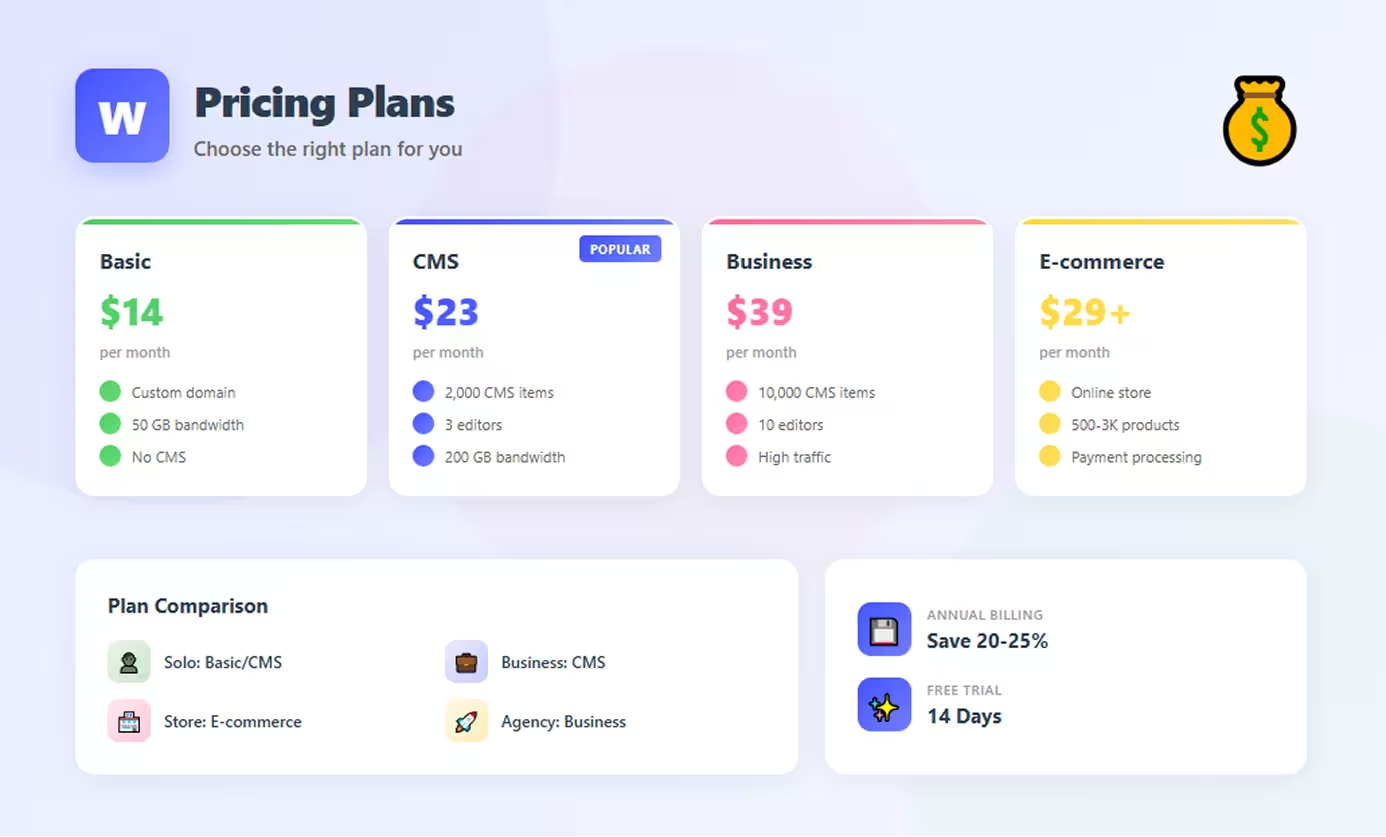
Basic Plan ($14/month)
Cost: $14/month annual ($18/month monthly)
What's included:
- Custom domain connection
- 100 pages
- No CMS
- 50 GB bandwidth
- 50 form submissions/month
- SSL security
Best for:
- Simple landing pages
- Personal portfolios without blogs
- Brochure websites with static content
- Low-traffic sites (under 50K visits/month)
Limitations:
- No CMS (no blog, no dynamic content)
- Limited form submissions
- Not suitable for content-heavy sites
CMS Plan ($23/month)
Cost: $23/month annual ($29/month monthly)
What's included:
- Everything in Basic, plus:
- 2,000 CMS items
- 3 content editors
- Full CMS capabilities
- 200 form submissions/month
- Site search
- 200 GB bandwidth
Best for:
- Blogs and content sites
- Marketing websites with case studies
- Small business sites needing CMS
- Portfolio sites with project galleries
- Resource centers and knowledge bases
Sweet spot:Most popular plan—balances features and cost perfectly for typical business websites and content-driven sites.
Business Plan ($39/month)
Cost: $39/month annual ($49/month monthly)
What's included:
- Everything in CMS, plus:
- 10,000 CMS items
- 10 content editors
- 400 form submissions/month
- Site search with 10,000 searchable items
- Bandwidth varies (based on CMS needs)
Additional options (modular pricing):
- Choose CMS item tiers (10K, 15K, 20K)
- Higher tiers cost more ($49-212/month)
- Bandwidth adjusts with tier
Best for:
- High-traffic blogs and publications
- Marketing sites with extensive content
- Large teams needing multiple editors
- Content platforms approaching CMS limits
Enterprise Plan (Custom)
Cost: Custom pricing (contact sales)
What's included:
- Custom bandwidth and CMS limits
- Dedicated customer success manager
- SSO and advanced security
- Custom SLAs and support
- Volume discounts
- White-glove onboarding
Best for:
- Large corporations with complex needs
- High-traffic sites (1M+ monthly visitors)
- Organizations requiring compliance features
- Businesses managing many sites
Workspace Plans Breakdown
Workspace Plans control your design environment—collaboration, projects, and team features.
Free Workspace
Cost: $0/month
What's included:
- 2 unhosted projects
- 1 workspace member (you)
- Basic features
- No code export
Best for:
- Solo users with 1-2 sites
- Learning and experimentation
- Personal projects not requiring collaboration
Core Workspace ($19/month)
Cost: $19/month annual ($24/month monthly)
What's included:
- 10 unhosted projects
- Code export capability
- Password-protected staging
- Custom code in projects
Best for:
- Freelancers managing multiple client sites
- Developers needing code export
- Anyone building 3+ sites simultaneously
Growth Workspace ($49/month)
Cost: $49/month annual ($60/month monthly)
What's included:
- Unlimited unhosted projects
- Unlimited staging sites
- Advanced team permissions
- Full collaboration features
Best for:
- Agencies with many clients
- Large teams collaborating actively
- Businesses managing many projects
E-commerce Plans
E-commerce Plans add online store functionality to your site—these are site plans specifically for selling products.
Standard ($29/month)
Cost: $29/month annual ($42/month monthly)
What's included:
- 500 products
- 2% transaction fee (plus payment processor fees)
- Basic e-commerce features
- Standard checkout
Best for:
- Testing e-commerce viability
- Small stores with low volume
- Digital products with minimal SKUs
Important: The 2% fee adds up—at $5,000/month revenue, that's $100 extra in fees.
Plus ($74/month)
Cost: $74/month annual ($84/month monthly)
What's included:
- 1,000 products
- 0% transaction fee
- Abandoned cart recovery
- Advanced e-commerce features
Best for:
- Growing stores doing $3,000+/month
- Businesses wanting full e-commerce features
- Stores outgrowing Standard plan fees
Break-even: At ~$3,700/month revenue, the 2% fee equals the price difference between plans.
Advanced ($212/month)
Cost: $212/month annual ($235/month monthly)
What's included:
- 3,000 products (15,000 SKUs with variants)
- 0% transaction fee
- All e-commerce features
- Priority support
Best for:
- High-volume stores
- Large product catalogs
- Established businesses with consistent revenue
Which Plan Should You Choose?
Selecting the right plan depends on your specific use case and growth trajectory.
For Personal Projects/Portfolios
Recommendation: Basic Plan ($14/month)
If you need a blog: CMS Plan ($23/month)
Why:
- Custom domain for professional presence
- Sufficient bandwidth for portfolio traffic
- No unnecessary features
- Affordable for individuals
For Freelancers and Agencies
Recommendation:
- Core Workspace ($19/month) for project management
- Basic or CMS Site Plans for each client site (client pays)
Why:
- 10 unhosted projects for client work
- Code export for flexibility
- Clients cover their own hosting
- Scales with client growth
For Small Businesses
Recommendation: CMS Plan ($23/month)
If high traffic: Business Plan ($39/month)
Why:
- CMS for blog, case studies, team pages
- Content editors for team members
- Marketing-focused features
- Room to grow
For E-commerce Stores
Recommendation:
- Just starting: Standard ($29/month)
- Doing $3,000+/month: Plus ($74/month)
- High volume: Advanced ($212/month)
Why:
- Start affordable, upgrade as revenue grows
- Avoid 2% fees once profitable
- Scale features with business growth
For Enterprises
Recommendation: Enterprise Plan (custom)
Why:
- Custom limits match your needs
- Dedicated support for mission-critical sites
- Security and compliance requirements
- Volume pricing for multiple sites
Hidden Costs to Consider
Beyond base plans, factor in potential additional costs:
Add-ons
- Localization: $9-29/month per locale
- Advanced features: Varies by feature
- Site backups: Included, but restoration may require support
Third-Party Integrations
- Email marketing: Mailchimp, ConvertKit ($10-100+/month)
- Advanced search: Algolia ($0-100+/month)
- Forms: Typeform, JotForm ($20-80+/month)
- Analytics: Beyond basic (varies)
Custom Code/Development
- Freelancer: $50-150/hour for custom work
- Agency: $100-250+/hour
- One-time setup: $500-5,000+ depending on complexity
Total cost can be 2-3× base plan pricing when including integrations and development.
Conclusion
Webflow pricing is structured to scale with your needs—starting affordable for individuals and growing with businesses. The key is understanding the dual structure: Site Plans for hosting, Workspace Plans for collaboration.
For most users, the sweet spot is:
- Solo/small business: CMS Plan ($23/month) + Free Workspace
- Freelancer: Core Workspace ($19/month) + client-paid Site Plans
- E-commerce: Plus Plan ($74/month) once revenue justifies it
- Agency: Growth Workspace ($49/month) + multiple Site Plans
Start conservatively—you can always upgrade as needs grow. Most users overestimate initial requirements. Begin with the minimum viable plan, then upgrade when hitting actual limits rather than anticipated ones.
Remember that annual billing saves 20-25% but locks you in. If uncertain, start monthly for flexibility, then switch to annual once confident in your choice.
The "right" plan balances current needs with room to grow. Webflow's strength is its scalability—your website and pricing can evolve together without platform migrations.
FAQs
Q: Can I start with a free plan and upgrade later?
A: Yes, you can start with the free Starter plan to learn Webflow, then upgrade to a paid Site Plan when ready to publish. All your work transfers seamlessly. However, you'll need to upgrade to connect a custom domain.
Q: Do I need both a Site Plan and a Workspace Plan?
A: Not necessarily. If you're building one website for yourself, you only need a Site Plan (Workspace stays free). You need a paid Workspace Plan only if you're managing multiple projects, need code export, or collaborate with a team.
Q: What happens if I exceed my bandwidth or CMS limits?
A: Webflow provides "burst protection" for temporary overages. If you consistently exceed limits, you'll receive upgrade prompts. Sites won't go down immediately, but you'll need to upgrade to avoid service interruptions.
Q: Is there a refund policy if I change my mind?
A: Yes, Webflow offers a 14-day money-back guarantee on annual plans from the initial purchase date. Monthly plans can be canceled anytime but aren't refunded for partial months.
Q: Are payment processing fees included in e-commerce plans?
A: No, Stripe and PayPal charge separate processing fees (typically 2.9% + $0.30 per transaction). Webflow's transaction fees on the Standard plan are in addition to these payment processor fees, which is why the Plus plan becomes cost-effective at higher volumes.