Introduction
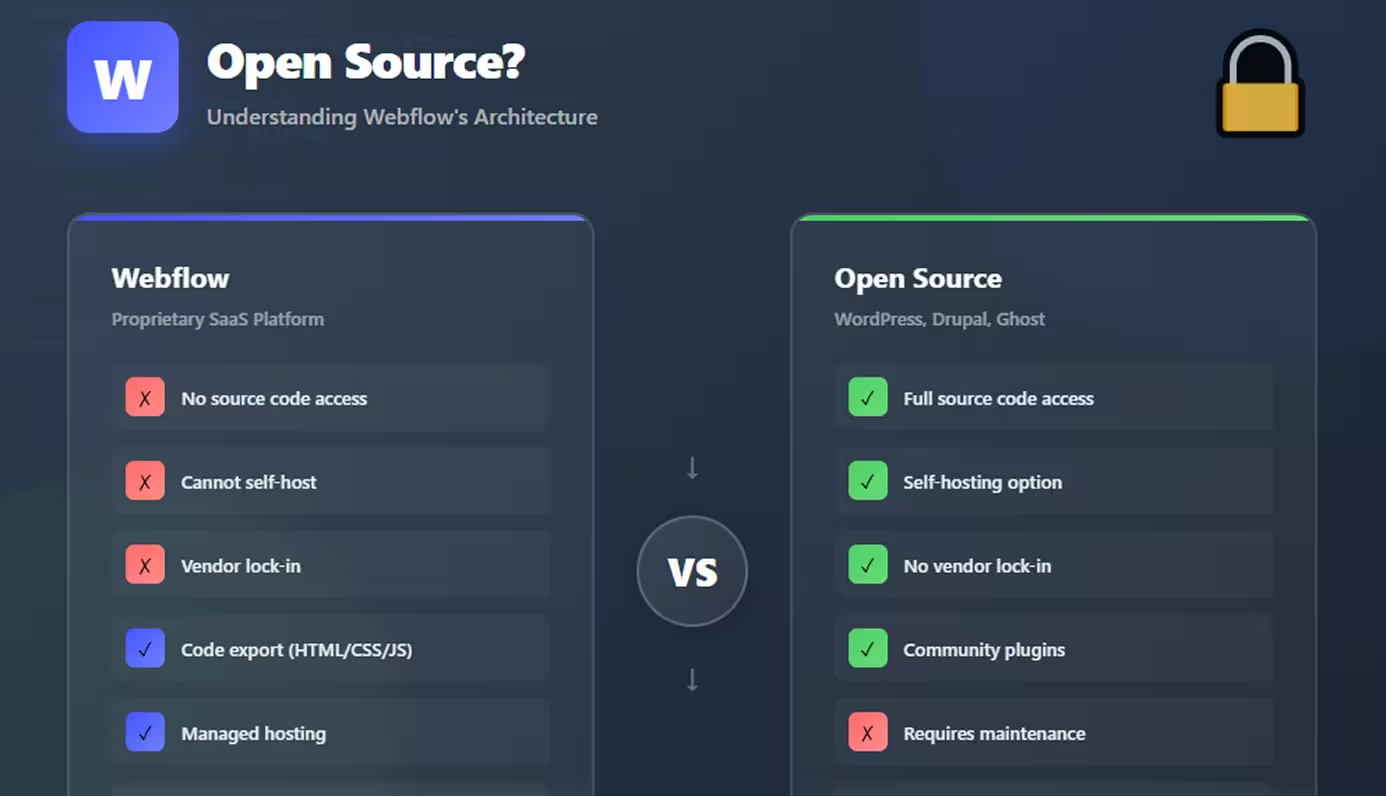
No, Webflow is not open source. It's a proprietary, closed-source SaaS (Software as a Service) platform owned and operated by Webflow, Inc. Unlike open source platforms where you can access, modify, and self-host the underlying code, Webflow's core platform, CMS, hosting infrastructure, and Designer tool are entirely proprietary.
Open source software means the source code is publicly available, allowing anyone to inspect, modify, and distribute it freely. Popular open source web platforms include WordPress, Drupal, and Ghost—where developers can access every line of code, contribute improvements, and host the software wherever they choose.
This distinction matters significantly for developers, businesses, and agencies evaluating Webflow. Understanding that it's not open source shapes expectations around customization limits, hosting flexibility, long-term costs, and platform control. While Webflow offers code export capabilities, this doesn't make it open source—it simply provides access to the HTML/CSS output your designs generate.
This guide explains exactly what "not open source" means for Webflow users—what you can and cannot access, how Webflow compares to open source alternatives, and the practical implications for your projects. Whether you're choosing between platforms or curious about Webflow's architecture, you'll understand the trade-offs clearly.
Understanding Open Source Software
Open source software operates under licenses that grant users specific freedoms and rights.
Definition of Open Source
The Open Source Initiative defines open source with these key principles:
Free redistribution: Anyone can distribute the softwareSource code access: Complete code must be availableDerived works: Users can modify and create variationsNo discrimination: Available to all people and purposesTechnology-neutral: Not restricted to specific platforms
Examples of Open Source Platforms
WordPress:
- Powers 43% of all websites
- Fully open source (GPL license)
- Thousands of contributors
- Self-hostable and modifiable
Drupal:
- Enterprise-level CMS
- Open source framework
- Extensive customization possible
- Community-driven development
Ghost:
- Modern publishing platform
- Open source (MIT license)
- Self-hostable
- Developer-friendly
Benefits of Open Source
Transparency: Inspect all code for security and qualityCustomization: Modify anything to fit specific needsCommunity: Benefit from global contributor baseCost: Often free (though hosting/development costs remain)No vendor lock-in: Migrate freely, own your infrastructureInnovation: Collective improvements from thousands of developers
Webflow's Business Model
Webflow operates as a proprietary SaaS platform with a fundamentally different approach than open source.
Proprietary SaaS Platform
What this means:
Webflow is closed-source software delivered as a cloud service. You access Webflow's tools through their hosted platform—you never download, install, or access the underlying code that powers the Designer, CMS, or hosting infrastructure.
Key characteristics:
- Subscription-based: Pay monthly/annual fees for access
- Cloud-only: No self-hosting option available
- Centralized control: Webflow controls all updates and features
- Managed service: Hosting, security, and maintenance included
Closed-Source Architecture
What remains proprietary:
- Designer tool: The visual design interface code
- CMS engine: Database and content management system
- Hosting infrastructure: Server architecture and CDN
- E-commerce system: Shopping cart and checkout functionality
- Interactions engine: Animation and interaction system
- Backend APIs: Internal APIs powering the platform
You cannot:
- Access Webflow's source code
- Modify core platform functionality
- Self-host Webflow software
- Contribute code changes to Webflow
- Fork Webflow to create your own version
How Webflow Makes Money
Revenue model:
Site Plans: $14-212/month per website for hostingWorkspace Plans: $19-49/month for design environmentE-commerce Plans: Additional fees for online storesAdd-ons: Localization and other premium features
Webflow's business depends on ongoing subscriptions. Unlike open source where money comes from hosting/services/support, Webflow's model requires continuous platform access fees.
What This Means for Users
Practical implications:
You rent, not own: Access to Webflow requires active subscriptionPlatform dependency: Cannot migrate away without rebuildingCost predictability: Ongoing monthly costs for life of siteFeature access: New features released at Webflow's discretionNo code access: Cannot inspect or modify platform internals
What You Can Access in Webflow
While not open source, Webflow offers code export—but with important limitations.
Code Export Feature
What you get:
Webflow allows exporting the front-end code your designs generate:
- HTML files: Complete page structure
- CSS files: All styles and layouts
- JavaScript: Interactions and dynamic behavior
- Assets: Images, fonts, and media files
How it works:
- Requires paid Workspace Plan (Core or Growth)
- Export via Project Settings > Export Code
- Downloads ZIP file with all generated files
- Files are production-ready, optimized code
HTML, CSS, and JavaScript Output
Code quality:
Webflow generates clean, semantic, production-grade code:
- Semantic HTML5: Proper heading hierarchy, accessibility
- Organized CSS: Class-based, no inline styles
- Vanilla JavaScript: No jQuery dependency (modern Webflow)
- Responsive: All breakpoint styles included
- Optimized: Minified CSS, compressed assets
Use cases:
- Host exported code on custom servers
- Integrate into existing applications
- Hand off to developers for customization
- Archive permanent copies of sites
Limitations of Exported Code
Critical restrictions:
No CMS functionality: Exported code is static HTML
- Dynamic content becomes hard-coded
- No database or content management
- Blog posts become individual HTML files
- Forms lose submission handling
No backend: Server-side features missing
- Form submissions require external service
- User accounts not functional
- E-commerce completely non-functional
- API integrations need reimplementation
No Designer: Visual editing impossible
- Changes require hand-coding HTML/CSS
- Cannot use Webflow Designer to update
- Lose visual workflow advantages
- Requires traditional development skills
Hosting requirements: Self-hosting challenges
- Need web server setup
- SSL certificate management
- No CDN unless configured separately
- Manual deployment process
What Remains Proprietary
Cannot export:
- Webflow Designer: The visual editing tool itself
- CMS database: Content and data structures
- Hosting platform: Server infrastructure
- Interactions 2.0: Some advanced animations
- E-commerce backend: Payment processing, inventory
- Form handling: Submission processing logic
- User authentication: Login systems
Bottom line: Code export gives you the presentation layer but not the application layer or infrastructure.
Webflow vs Open Source Alternatives
Comparing Webflow to open source platforms reveals distinct trade-offs.
WordPress Comparison
WordPress (Open Source):
Pros:
- Completely free software (GPL license)
- Self-hostable on any server
- Full code access to modify anything
- Massive plugin ecosystem (60,000+ plugins)
- Theme marketplace with thousands of options
- Developer control over every aspect
- No vendor lock-in or subscription requirements
Cons:
- Requires maintenance (updates, security, backups)
- Technical knowledge needed for hosting
- Security responsibility falls on you
- Performance optimization requires expertise
- Plugin conflicts and compatibility issues
- Hosting costs still apply
Webflow (Proprietary):
Pros:
- Zero maintenance (Webflow handles everything)
- Managed security and updates
- Visual design without code
- Reliable hosting included
- Clean code output
- Performance optimized automatically
Cons:
- Not open source (no code access)
- Ongoing subscription required
- Vendor lock-in to Webflow platform
- Limited extensibility compared to WordPress
- Higher long-term costs for hosted sites
- Cannot self-host
Other Open Source Options
Drupal:
- Enterprise-grade CMS
- Extremely flexible and powerful
- Steep learning curve
- Best for complex, custom applications
Ghost:
- Modern publishing platform
- Developer-friendly (Node.js)
- Clean, fast blogging
- Best for content-focused sites
Strapi (Headless CMS):
- Open source headless CMS
- API-first architecture
- Combine with any frontend
- Best for custom applications
Trade-offs Between Webflow and Open Source
Choose Webflow if you value:
- Ease of use over maximum flexibility
- Managed service over DIY control
- Visual workflow over code-first development
- Zero maintenance over cost savings
- Reliability over customization depth
Choose open source if you value:
- Complete control over platform
- No ongoing fees (beyond hosting)
- Self-hosting capability
- Unlimited customization potential
- Community contributions and plugins
- Long-term cost optimization
Advantages of Webflow's Closed System
Proprietary architecture delivers specific benefits open source cannot match.
Managed Infrastructure
Everything handled for you:
- Global CDN: Fast loading worldwide
- SSL certificates: Automatic HTTPS
- Backups: Regular automated backups
- Uptime: 99.9%+ reliability
- Scaling: Automatic traffic handling
- Security patches: Immediate deployment
Time saved: Hundreds of hours not spent on server management, security monitoring, and infrastructure optimization.
Consistent Updates
Platform evolution:
- New features released regularly
- Bug fixes deployed instantly
- Performance improvements automatic
- No breaking changes to your sites
- Backward compatibility maintained
No action required: Wake up to improved platform without migration work.
Security and Reliability
Enterprise-grade protection:
- DDoS mitigation: Cloudflare integration
- Security monitoring: 24/7 threat detection
- Compliance: SOC 2 Type II certified
- Data redundancy: Multi-region backups
- Incident response: Professional security team
No Maintenance Burden
Zero technical overhead:
- No plugin updates to manage
- No database optimization
- No server configuration
- No compatibility testing
- No emergency patches
Focus on business: Spend time on design and content, not infrastructure.
Disadvantages of Webflow Not Being Open Source
Closed-source architecture creates limitations worth understanding.
Vendor Lock-In
Platform dependency:
- Cannot migrate easily to other platforms
- Subscription required indefinitely
- Price increases affect you permanently
- Feature removal possible at Webflow's discretion
- Business continuity depends on Webflow staying operational
Risk: If Webflow changes direction or increases prices dramatically, you're locked in.
Limited Customization
Boundaries exist:
- Cannot modify core platform behavior
- No custom plugins like WordPress
- Limited backend customization
- API restrictions for integrations
- Feature requests may never be implemented
Workarounds required: Complex needs may need external services or custom code.
No Community Contributions
Closed development:
- No public roadmap (limited transparency)
- Cannot contribute code improvements
- No plugin ecosystem from third parties
- Dependent on Webflow's development priorities
- Feature gaps remain until Webflow addresses
Cost Considerations
Long-term expense:
- Ongoing subscriptions for site lifetime
- Costs accumulate over years
- Multiple sites multiply costs
- No self-hosting cost savings option
- Price increases unavoidable
Calculation: 5-year Webflow cost vs one-time open source development may favor open source for budget-conscious projects.
Conclusion
Webflow is definitively not open source—it's a proprietary SaaS platform where you rent access to powerful design tools and managed infrastructure but never own or control the underlying software.
This closed-source approach trades flexibility for convenience. You sacrifice the complete control, self-hosting, and community-driven development of open source platforms in exchange for zero maintenance, professional hosting, visual workflows, and managed security.
For many users, this trade-off is worthwhile. Designers, small businesses, and agencies benefit enormously from Webflow's managed approach—focusing on design and content rather than server administration. The time and expertise saved often justify subscription costs.
For others, open source remains essential. Large organizations with complex requirements, developers who need deep customization, or budget-conscious projects benefiting from self-hosting may find WordPress, Drupal, or other open source platforms better aligned with their needs.
The key is understanding what "not open source" means practically: You can export front-end code but lose CMS functionality. You get managed hosting but accept vendor lock-in. You avoid maintenance but pay ongoing subscriptions.
Choose based on your priorities—if ease of use, reliability, and managed infrastructure matter most, Webflow's closed system excels. If maximum control, cost minimization, and self-hosting are critical, explore open source alternatives. Both approaches are valid; neither is universally superior.
FAQs
Q: Can I access Webflow's source code if I pay for an expensive plan?
A: No, Webflow's source code is proprietary regardless of plan tier. Even Enterprise customers cannot access the platform's underlying code. The only code you can access is the HTML/CSS/JS your designs generate through code export.
Q: If I export my Webflow code, do I own it completely?
A: You own the exported HTML, CSS, and JavaScript files and can use them however you want. However, exported code is static—you lose CMS, e-commerce, forms, and hosting features. You'll need to implement these separately if needed.
Q: Is there an open source alternative that works like Webflow?
A: No exact equivalent exists. The closest is combining a headless CMS (like Strapi or Directus) with a visual builder, but this requires more technical setup. WordPress with page builders (Elementor, Oxygen) offers some visual design but isn't as refined as Webflow.
Q: Can developers contribute features to Webflow?
A: No, Webflow doesn't accept external code contributions. As a proprietary platform, all development happens internally at Webflow, Inc. You can submit feature requests through their forums, but implementation depends entirely on Webflow's roadmap.
Q: Will Webflow ever become open source?
A: Extremely unlikely. Webflow's entire business model depends on subscription revenue from a proprietary platform. Open sourcing would eliminate their revenue stream. There's no indication Webflow has any plans to change this fundamental business model.